
A convincing AI narrator can still stumble over a character’s name, read an acronym as a strange word, or pronounce “2026” in a way that makes no sense in the sentence. In ElevenLabs, these errors often need a text or pronunciation-rule fix, not a new voice or a dramatic change in voice settings.
This guide covers a practical correction sequence: rewrite ambiguous text, choose how acronyms should be spoken, handle character names consistently, and use pronunciation dictionaries where the selected ElevenLabs model supports them.
Our actual ElevenLabs pronunciation test: original vs rewritten
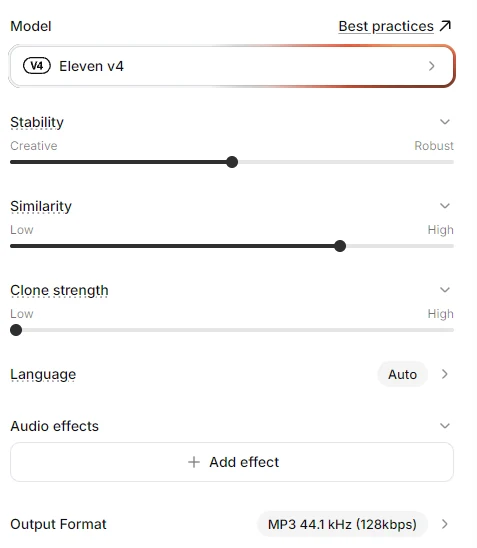
On November 7, 2026, an AI Revolution editor generated two real English voiceover clips using the voice Mark — Casual, Relaxed and Light and the Eleven v4 model. In both recordings, the model was set to Language: Auto, and the download format was MP3, 44.1 kHz, 128 kbps. Stability, Similarity and Clone strength are visible in our screenshot, but ElevenLabs did not display numeric slider values there. We did not record credit consumption for these two generations, so we are not assigning an invented cost.
Actual voice selection and settings screenshots:

Test A: the original script
“Zuri found 3 mysterious crystals on 7 Nov 2026. The AI scanner measured 1,024 pixels and displayed a 4K image. The new engine costs €25 and runs at 30 fps.”
Download the actual original MP3 (about 14.37 seconds).
Test B: rewritten for spoken delivery
“Zoo-ree found three mysterious crystals on November seventh, twenty twenty-six. The A I scanner measured one thousand and twenty-four pixels and displayed a four K image. The new engine costs twenty-five euros and runs at thirty frames per second.”
Download the actual rewritten MP3 (about 14.21 seconds).
What Happened in Our Test?
After listening to both clips, our editor reported no noticeable improvement from the rewritten script. That was not the result we expected when we prepared the comparison. You can play both recordings above and judge the pronunciation yourself.
| Comparison | What happened |
|---|---|
| Original text (Test A) | The listener did not report a significant pronunciation problem |
| Rewritten text (Test B) | No clearly audible improvement was reported |
| Listener preference | No clear preference between the two recordings |
| What we can conclude | For this voice and these two takes, rewriting the script did not bring an obvious benefit |
Both recordings used the same voice and model, with one generation per script. The corrected file is roughly 0.16 seconds shorter, but a duration difference does not tell us whether pronunciation improved. This is a small practical test, not a statistical comparison of ElevenLabs models.
When Rewriting Does Not Help
If the first generation already pronounces a number, acronym or name acceptably, you may gain nothing by writing every digit in words. In our test, rewriting an entire short paragraph added preparation work without a clear audible benefit.
Instead, listen to the original output first. Mark the exact word that sounds wrong, change only that word, and generate a short new clip with the same voice and model. This makes it easier to tell which change affected the result. If a recurring fictional name or brand term is still inconsistent, move on to a pronunciation alias or dictionary rule rather than rewriting every sentence.
Practical takeaway: edit pronunciation selectively, not automatically. The dictionary approach below follows ElevenLabs documentation; it was not part of these two recordings.
Start with the exact word the listener should hear
Before changing model parameters, decide how the word is meant to sound. Some strings have more than one correct interpretation: “AI” can be spoken as two letters, “NASA” is commonly spoken as a word, “3/4” might mean three quarters or March fourth depending on context, and “2026” can be read in more than one natural way.
ElevenLabs explicitly recommends writing numbers, dates, symbols and acronyms in full words when you need a specific spoken reading. The company notes that abbreviated strings can be ambiguous to the voice model. Official explanation.
Fix 1: Write out numbers, amounts and abbreviations
For a one-off recording, the simplest method is often to replace how the script looks with how it should sound. Keep a separate display copy if the captions must show figures and symbols.
| On-screen text | Voiceover-friendly script example |
|---|---|
| €25 | twenty-five euros |
| 3.5 seconds | three point five seconds |
| 1,024 pixels | one thousand and twenty-four pixels |
| 4K video | four K video |
| Nov 7, 2026 | November seventh, twenty twenty-six |
| AI TTS | A I text-to-speech |
These are illustrative preferred readings for an English voiceover, not model-tested guarantees. Choose the wording that makes sense for your audience and locale. “One thousand and twenty-four” and “ten twenty-four” might both be legitimate in different contexts, but the narration should reflect what you actually intend.
Before: “The update costs €25 and exports in 4K at 30 fps.”
Voiceover script: “The update costs twenty-five euros and exports in four K at thirty frames per second.”
On-screen caption: “€25 · 4K · 30 fps”
Fix 2: Decide whether an acronym is spoken or spelled
Do not rely on capitalization alone to tell a model whether a string is a word or individual letters. In your recording script, write “A I”, “U S B” or a complete phrase when that is how listeners should hear it. For proper abbreviations with conventional pronunciations, use their ordinary spoken form.
If the term appears throughout a long script, manually rewriting every instance is error-prone. This is where a pronunciation dictionary alias becomes useful: it maps an exact written term to a preferred replacement. ElevenLabs documents aliases for names, brands and acronyms, including expansion of an acronym into words. Official best-practices reference.
Fix 3: Make a consistent rule for character names
Animated characters often have invented names. A voice model has no way to know the pronunciation you chose for your fictional world. First write a simple pronunciation key for each character, then repeat the same test sentence with the same model and voice until the result is acceptable.
Illustrative script: “Zuri checked the map. Zuri smiled and called for his friends.”
Preparation: Decide whether the intended pronunciation is “Zoo-ree” or another reading; write that decision in the production style guide. An alias can then be tried if the voice does not naturally use the intended pronunciation.
Try the name in a complete sentence before applying the spelling to a whole project. A respelling that works with one voice or language may sound wrong with another.
Fix 4: Use a pronunciation dictionary when the script is long
Documentation-based solution: Our two audio clips tested script rewriting, not dictionary rules. The steps in this section are based on the provider’s published instructions and are worth testing when a particular name, acronym or brand is repeatedly mispronounced.
ElevenLabs provides pronunciation dictionaries with alias rules and, for supported models, phoneme rules. An alias substitutes another written form. A phoneme rule specifies a pronunciation using notation such as IPA or CMU. ElevenLabs documentation says model compatibility varies, so check the currently selected model before relying on phoneme-based control. Pronunciation dictionary guide.
Example dictionary: expand an acronym
This small illustrative PLS file defines an alias rule. The XML format and alias element are based on ElevenLabs documentation; this specific example has not been uploaded or tested in our account.
Aliases are especially useful when you want a written term to stay the same in the project but be spoken differently. For made-up character names, choose a replacement that sounds right in a short audio preview before committing to it.
Where do you add a pronunciation rule?
In ElevenLabs Studio, the company’s help center describes a Pronunciations Editor that can add and preview rules and attach a dictionary to the current project. The interface and model support may change, so refer to the official Studio instructions if the menu name differs in your account.
- Open the project containing the troublesome name or acronym.
- Open the Pronunciations Editor, if available for that product and model.
- Select the troublesome word, or type it into the rule editor.
- Try a simple alias substitution first. Use phoneme notation only when you understand the sound and the model supports it.
- Use the preview control if available, then generate a short sample with the final voice.
- Confirm that the same rule works in more than one sentence; unusual neighboring words may influence pronunciation.
Do pronunciation dictionaries work with every ElevenLabs model?
No. The documentation describes different compatibility for different model families and products. As of our review of the current docs, the ElevenLabs pronunciation-dictionary API documentation lists phoneme support for eleven_v4, eleven_v4_turbo, eleven_flash_v2 and eleven_v3, and says unsupported models can use alias substitution instead. Another Studio-specific help page describes narrower availability for phoneme tags in that interface. Because documentation and product surfaces differ, confirm support in the actual model and interface you’re using rather than assuming every dictionary feature works everywhere. API model-compatibility reference.
When a name still sounds wrong
- Check the language: a pronunciation respelling designed for English may be read differently by a multilingual model.
- Check stress: two syllables can sound like a different name when the emphasis moves.
- Test a complete sentence: a name pronounced alone may sound different in natural speech.
- Keep capitalization consistent: ElevenLabs notes that dictionary matching may be case-sensitive; add the variants you actually use.
- Change one thing at a time: keep the same voice, model and sentence while testing aliases or spelling changes.
- Avoid overcorrecting: spelling every familiar word phonetically can damage the flow of an otherwise natural script.
A 10-minute pronunciation audit for a voiceover script
- Mark every proper name, fictional character, product name, acronym, currency amount, measurement and date.
- Write the intended spoken form for each one in a two-column script list.
- Replace the one-off ambiguous strings directly in the narration text.
- Create reusable aliases only for words that appear repeatedly.
- Generate a short passage containing at least three difficult words and listen without reading the text.
- Make only one correction per retry and save the exact changed text and sample.
- Export the final audio only after checking the full sentence in context.
For a fair comparison, record the model, voice, language, pronunciation rules, exact script, date, number of attempts and credits used. The two real clips and settings above give you a repeatable starting point.
Bottom line
Our Mark Casual / Eleven v4 comparison produced no obvious improvement when we rewrote numbers, acronyms and a character name. That tells us not to rewrite a script by default. When a specific word sounds wrong, try a targeted spelling change and compare the audio. For recurring names or abbreviations, ElevenLabs’ documented dictionary features offer a more reusable approach, subject to your model and interface.
For pacing, emotion and other natural-speech problems, read our seven real ElevenLabs audio experiments and our AI voiceover script-writing guide.
Sources and transparency: ElevenLabs numbers and acronyms help, pronunciation dictionaries, Studio editor help. The two embedded recordings and settings screenshots are from our test. The XML pronunciation-dictionary sample is an illustrative, documentation-based example.