Physical Address
304 North Cardinal St.
Dorchester Center, MA 02124
Physical Address
304 North Cardinal St.
Dorchester Center, MA 02124

Creating an AI character is easy, but keeping the same character in AI generated images can be surprisingly difficult.
You might generate a perfect portrait, only to discover that the same person looks completely different in the next scene. Their face changes, their hairstyle shifts, or their eyes no longer match.
Fortunately, there are ways to improve character consistency.
In this guide, you’ll learn how to create a recognizable AI character, use reference images, write more reliable prompts, and avoid common mistakes.
AI image generators don’t automatically treat a character description as a permanent identity.
If you request “a young woman with short red hair and green eyes” several times, the generator may create different people who all match that description.
Even when you reuse the same prompt, results can vary because of changes in composition, lighting, pose, and the generation process.
The key is to provide more than a written description. A reference image gives the AI a visual example of the character you want to preserve.
You can create and edit AI characters using several image-generation tools. The best choice depends on whether you prefer simple text instructions, more advanced image controls, or creative visual styles.
Here are three options to explore:
ChatGPT — A beginner-friendly option for generating images and requesting changes through a conversation. You can upload an existing character image and ask ChatGPT to change the clothing, background, or scene while preserving recognizable features.
Leonardo AI — An AI image-generation platform with image-reference workflows. It may be useful if you want more control over character creation and visual style.
Midjourney — A creative image generator with reference-based features that can help maintain visual similarities across different scenes. Available controls depend on the current model and workflow.
For beginners, ChatGPT is a practical place to start because you can describe the changes in everyday language.
Image-generation availability and usage limits depend on your account and current plan.
The steps below explain a general workflow. Exact buttons, reference options, and free or paid features vary between platforms.
Start with a clear portrait showing the character’s face and distinctive features.
For our AI Revolution example, we chose a fictional young woman with short copper-red hair, green eyes, fair skin, and freckles.
Here’s a starting prompt:
Example prompt:
Create a photorealistic portrait of a fictional 25-year-old woman with short, tousled copper-red hair, green eyes, fair skin, and distinctive freckles across her nose and cheeks. She has a gentle smile and wears a simple black sweater. Use soft studio lighting, a neutral background, and a natural photographic style.
A good starting portrait should have a clearly visible face, natural lighting, and minimal visual distractions.
Save your favorite result. This will become your reference character.
A reference image is one of the most useful ways to improve character consistency.
Instead of asking an AI generator to invent the character again, provide the original portrait when the tool supports image references or image editing.
Then describe what should change and what should remain consistent.
Prompt used in our Café Scene test:
Use the attached portrait as the reference image. Generate a new photorealistic image of the same fictional woman sitting in a cozy café, wearing a cream-colored knitted sweater. Preserve her recognizable facial identity, facial proportions, green eyes, freckles, and short tousled copper-red hair. Change only the clothing, background, and pose. Use warm natural window lighting and realistic photography. Do not add text, labels, or a collage. Generate one image.
The important distinction is that the reference defines the character while the prompt describes the new scene.
Reference-image support varies between AI tools, and some generators may still change facial details.
When creating several images of the same character, avoid changing everything simultaneously.
Start with a simple variation, such as a new background or outfit.
Once you have a satisfactory result, experiment with more challenging changes, including camera angles, facial expressions, and poses.
Prompt used in our Outdoor Scene test:
Use the attached original portrait as the character reference. Create one photorealistic image of the same fictional woman standing on a coastal hiking trail at sunset. Preserve her recognizable facial identity, facial proportions, green eyes, freckles, and short tousled copper-red hair. She is wearing a dark hiking jacket and a backpack, with the ocean and mountains in the background. Show her from the waist up, looking toward the camera at a slight angle. Use natural golden-hour lighting. Do not add text, labels, or a collage. Generate one image.
Prompt used in our Office Scene test:
Use the attached original portrait as a reference. Create one photorealistic professional office portrait of the same fictional woman, seated at a desk wearing a black blazer over a white shirt. Preserve her recognizable facial features, green eyes, freckles, and short copper-red hairstyle. Show her face at a clear three-quarter angle, turned approximately 30 degrees away from the camera, while her eyes look toward the lens. Use natural office window lighting, a laptop on the desk, and a realistic photographic style. Do not add text, labels, or a collage. Generate one image.
These prompts are starting points, not guarantees of perfect identity preservation.
A reusable character description can help you avoid accidental changes.
For example:
| Feature | Character description |
|---|---|
| Age | Approximately 25 |
| Hair | Short, tousled copper-red hair |
| Eyes | Green |
| Skin | Fair, with freckles |
| Facial expression | Gentle, natural smile |
| Image style | Photorealistic photography |
Reuse the description alongside your reference image.
This is especially helpful when you’re creating illustrations for a story, social media series, or AI video project.
Before creating dozens of images, compare a small number of variations.
Look closely at the character’s face rather than relying only on the overall impression.
Check whether the eye color, facial proportions, freckles, hairstyle, and other distinctive features remain recognizable.
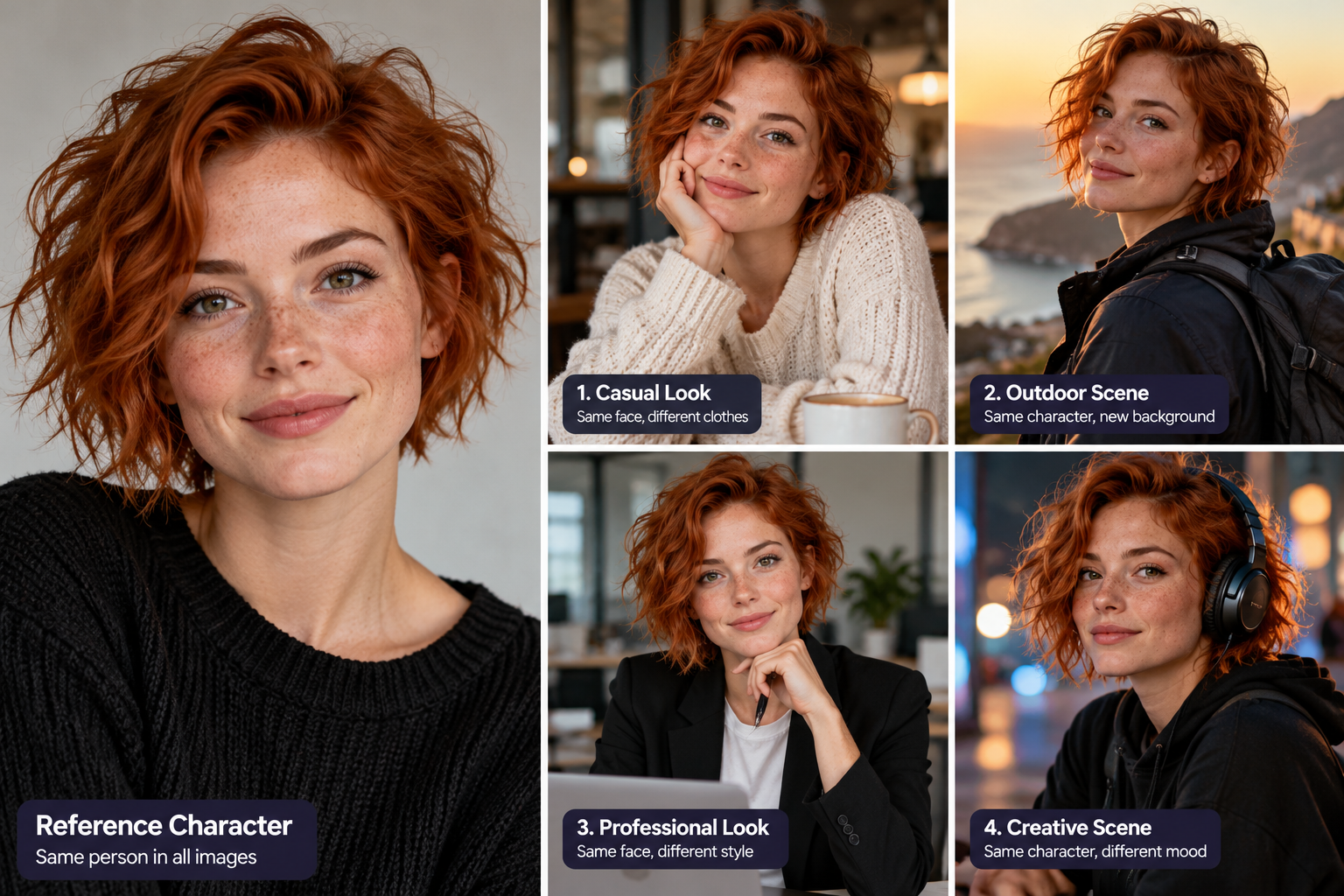
For our initial AI Revolution demonstration, we generated a collage showing one fictional character in five settings: a reference portrait, café, outdoor location, office, and nighttime scene.
The collage demonstrates the visual goal of character consistency. However, because the variations were produced together in one generation, it should not be interpreted as proof that separate generations will preserve identity equally well.
A more rigorous comparison would generate each scene independently using the same reference portrait.
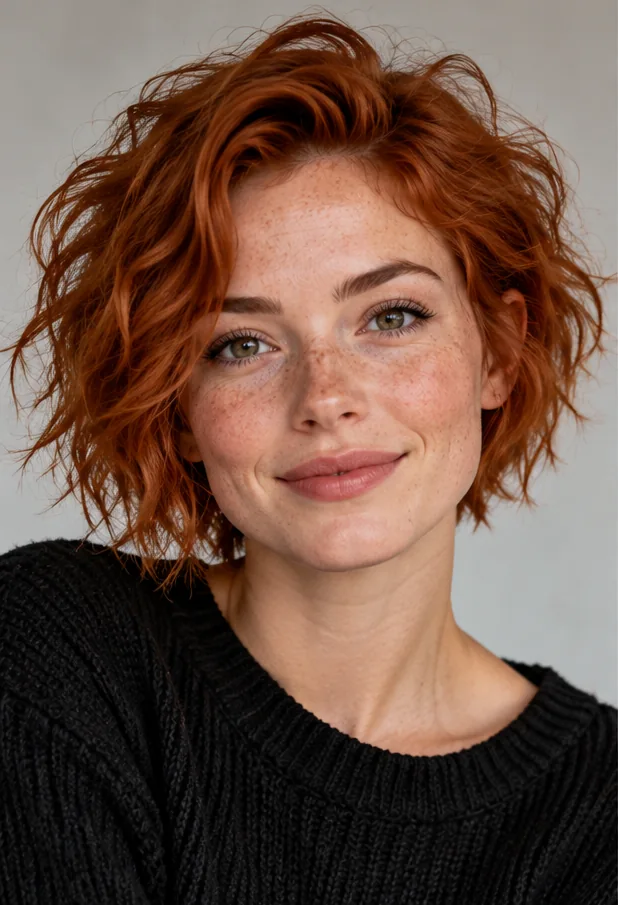
Original reference portrait used for all four ChatGPT image generations.
To see how well ChatGPT could preserve a fictional character across different settings and viewing angles, we generated four separate images using the same original reference portrait.
Our reference character had short copper-red hair, green eyes, fair skin, and distinctive freckles. For each generation, we supplied the original portrait rather than using the previous result as a reference.
Test 1: Café Scene
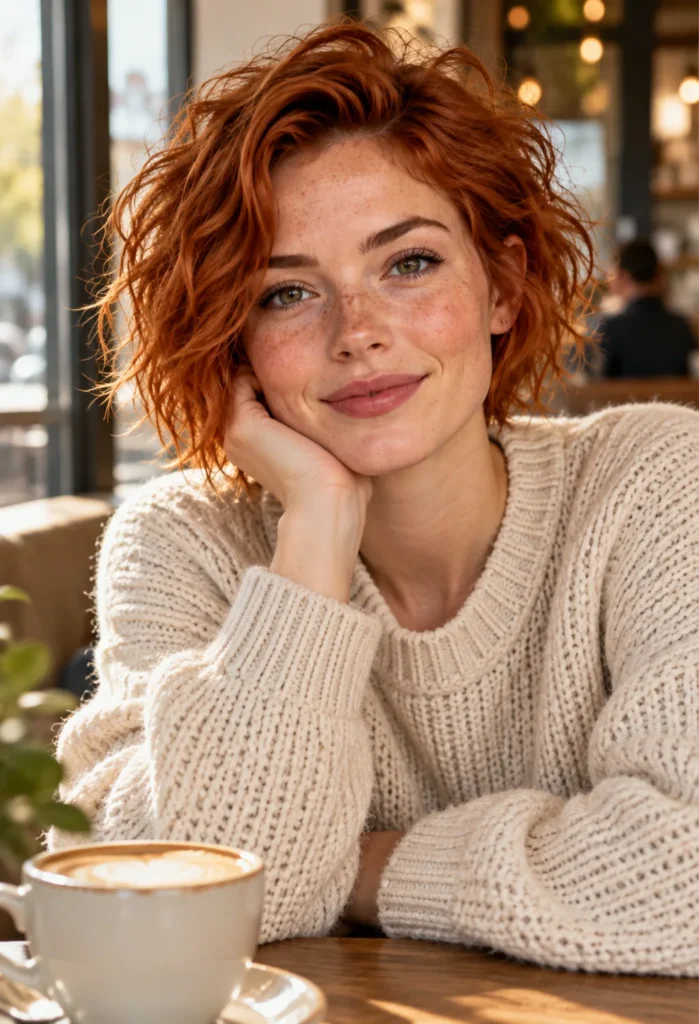
Test 1 — Café scene generated in ChatGPT using the original reference portrait.
We asked ChatGPT to place the character in a cozy café, wearing a cream-colored knitted sweater.
The generated image preserved her recognizable hairstyle, freckles, and general facial appearance while changing her clothing, surroundings, and pose.
Test 2: Outdoor Scene
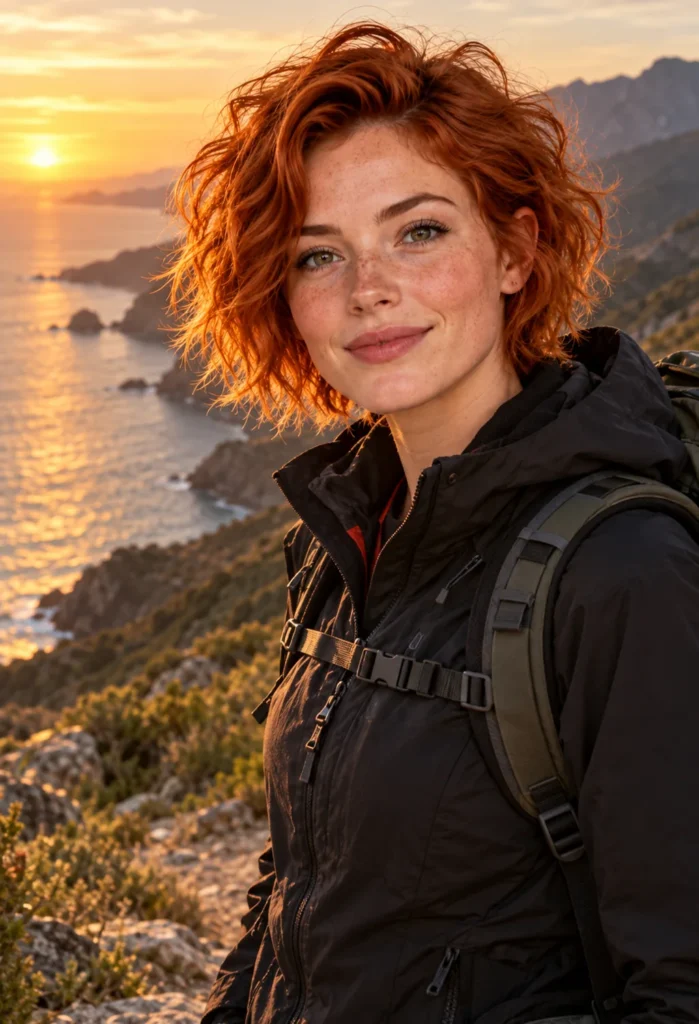
Test 2 — Outdoor scene generated in ChatGPT using the original reference portrait.
Next, we used the original portrait to create an image of the character on a coastal hiking trail at sunset.
Her facial features remained visually similar to the reference. The generator also followed the requested changes to clothing and environment, adding a dark hiking jacket, backpack, and coastal scenery.
Test 3: Office Scene

Test 3 — Office scene generated in ChatGPT using the original reference portrait.
For the third image, we requested a professional office portrait with a black blazer, white shirt, and a three-quarter facial angle.
The character remained recognizable, although the change in viewing angle was relatively modest. This result does not demonstrate how well the method would work with a full side profile.
Test 4: Side Profile — A More Difficult Challenge
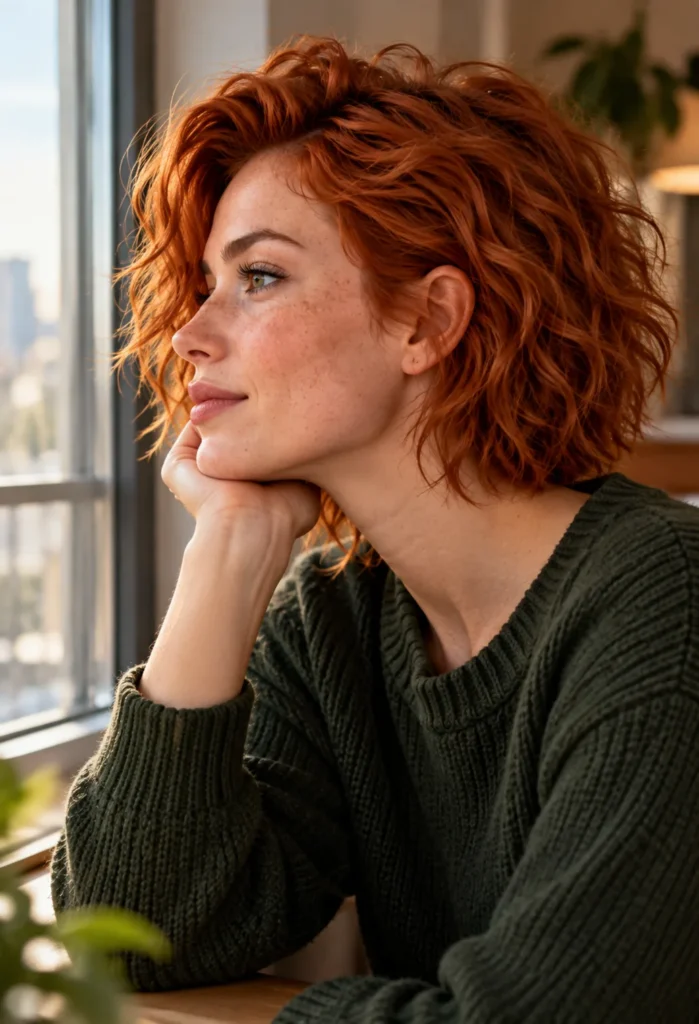
Test 4 — Side-profile image generated in ChatGPT using the original front-facing reference portrait.
For our fourth test, we asked ChatGPT to generate the same fictional woman in a near-90-degree side profile, looking toward a window.
We reused the original front-facing reference portrait and requested a dark green sweater, soft indoor lighting, and a clearly visible facial profile.
The result followed the requested change in viewing angle while retaining recognizable characteristics, including the copper-red hairstyle, freckles, and general facial appearance.
However, comparing a front-facing portrait with a side profile makes exact facial consistency harder to judge. A similar hairstyle and freckles do not necessarily mean every facial proportion has been preserved.
Practical takeaway: If your project requires multiple camera angles, test those angles early. A character that looks consistent in front-facing portraits may still change when viewed from the side.
What Did We Learn?
Across four separate ChatGPT image generations, our fictional character remained visually recognizable in café, outdoor, office, and side-profile scenes.
The most consistent characteristics were her copper-red hairstyle, freckles, and overall facial appearance. The generated images also followed the requested changes in clothing, environment, and lighting.
The side-profile test was particularly useful because it demonstrated a substantial change in viewing angle. However, exact facial proportions are more difficult to verify when comparing a front-facing portrait with a profile.
Important limitation: This was a small, qualitative demonstration using one reference character and four selected outputs—not a controlled benchmark. It does not establish a success rate or guarantee identical results across future generations.
Practical takeaway: Use a clear reference portrait, attach the original image for each new scene, and describe which facial characteristics should remain consistent. Test different viewing angles early, especially if you are creating a recurring character for stories, videos, or marketing visuals.
Try using the original reference image again rather than relying only on text.
Reduce unnecessary changes in the prompt and emphasize the character’s distinctive facial features.
Describe the hair precisely, including its length, color, and shape.
Remember that some changes may be caused by camera angle or lighting rather than a completely different hairstyle.
Use a consistent photographic style and avoid combining conflicting visual instructions.
A prompt requesting realistic photography, cartoon proportions, and dramatic fantasy rendering simultaneously may produce unpredictable results.
Large changes in camera angle can be difficult for image generators, particularly when only one front-facing reference is available.
If your tool supports multiple reference images, additional views may help.
Clearly separate identity-related instructions from scene-related instructions.
For example:
Keep: face, eyes, freckles, hairstyle.
Change: clothing, background, pose, lighting.
This structure makes the intended changes easier to understand.
You can improve consistency with detailed prompts, but text descriptions alone generally provide less direct control over a specific face.
Some tools offer seed controls, character references, identity features, or other specialized workflows. Their availability and effectiveness depend on the model and version.
For most beginners, a practical starting approach is to create one strong portrait, save it, and reuse it as a reference whenever the chosen generator supports that workflow.
ChatGPT’s image-generation and editing capabilities can be used to create variations based on an existing character image. However, exact facial consistency is not guaranteed, especially across substantial changes in pose or composition.
Not necessarily. Keep the identity description consistent, but change the scene instructions to match the image you want to create.
Not reliably. Seed controls can help reproduce or vary generation conditions in some tools, but using the same seed does not universally guarantee the same character when other settings change.
A useful starting workflow is to combine a clear reference portrait, a reusable character description, and controlled changes between scenes. For more demanding projects, specialized character-consistency features may provide additional control.
Keeping the same character across AI-generated images requires more than repeating a prompt.
Start with a recognizable portrait, preserve it as a reference, describe the character consistently, and change the surrounding scene deliberately.
Most importantly, compare your results carefully.
With a repeatable workflow, you can create more cohesive illustrations for stories, marketing materials, social media, and other creative projects.