

Can you design an original character voice from a text description, then use it in an actual voiceover? We tried ElevenLabs Voice Design for v4 with a fictional animated character. Our first design request was blocked by moderation. The revised description produced three candidate voices. We selected the third and generated a short emotional speech sample, embedded below so you can hear the output rather than rely on our description.
Test disclosure: This is one documented hands-on session on November 10, 2026, not a benchmark of all ElevenLabs voices. The editor preferred Voice 3 and felt it suited a female cartoon character better than the originally intended male character. That is a subjective listening judgment. We have not independently compared the two discarded previews as audio files.
Quick answer: create a custom voice
Voice Design is ElevenLabs’ feature for generating a new synthetic voice from a text description, rather than cloning an existing speaker. Open Voice Design, describe the voice, enter a preview script, generate and audition candidates, save your choice, then use it in Text to Speech. Our real session and its evidence follow.
Listen to the actual result
This 13.87-second MP3 is the actual speech file supplied from our ElevenLabs session. The saved voice was named Zuri – Female Character Test. It was generated with Eleven v4. This audio is a real test result; the article’s featured illustration is not.
Speech input text for accessibility
This is the exact submitted script, including emotion tags. It is an input-script reference, not a speech-verified transcript; the spoken words have not been independently transcribed.
Toby, look! I found something amazing! [excited] It’s glowing! Do you think it’s magic? [curious] Wait… did it just move? [surprised] Oh! Maybe we should be careful. [whispers] Let’s take a closer look!
Open the original MP3 if the audio player is unavailable.
What we tested
The goal was to create a light, cheerful, adventurous voice for a fictional animated character without recording or cloning any real person’s voice. We used the Voice Design panel, described the desired delivery, listened to the generated choices, saved one candidate and tested it in Text to Speech.
| Test detail | Recorded value |
|---|---|
| Date | November 10, 2026 |
| Voice creation | ElevenLabs Voice Design for v4 |
| Preview script | English text; TTS screenshot language setting: Auto |
| Seed (from share link) | 408328 |
| Loudness (share URL) | 0.5; the screenshot shows the slider toward Loud; numeric-to-UI mapping not verified |
| Guidance Scale (share URL) | 5.2; the screenshot shows the slider below the midpoint; numeric-to-UI mapping not verified |
| Generated candidates | 3 |
| Selected candidate | Voice 3 |
| Follow-up speech model | Eleven v4 |
| Speech export | MP3, 44.1 kHz, 128 kbps, approximately 13.87 seconds |
| Cost evidence | 252 credits displayed before voice generation; actual debit not independently reconciled |
Control meanings: Loudness affects output level, while Guidance Scale affects adherence to the voice description. The URL parameters above are not percentages of the sliders; we have not independently established their mapping to the interface.
Step 1: Open Voice Design and describe the character
In ElevenLabs, open Voice Design for v4. Describe what the voice should sound like rather than writing a long biography. Useful descriptors include vocal register, warmth, rhythm, emotional range, accent, and clarity. Do not request a recognizable person’s voice.
The successful voice description
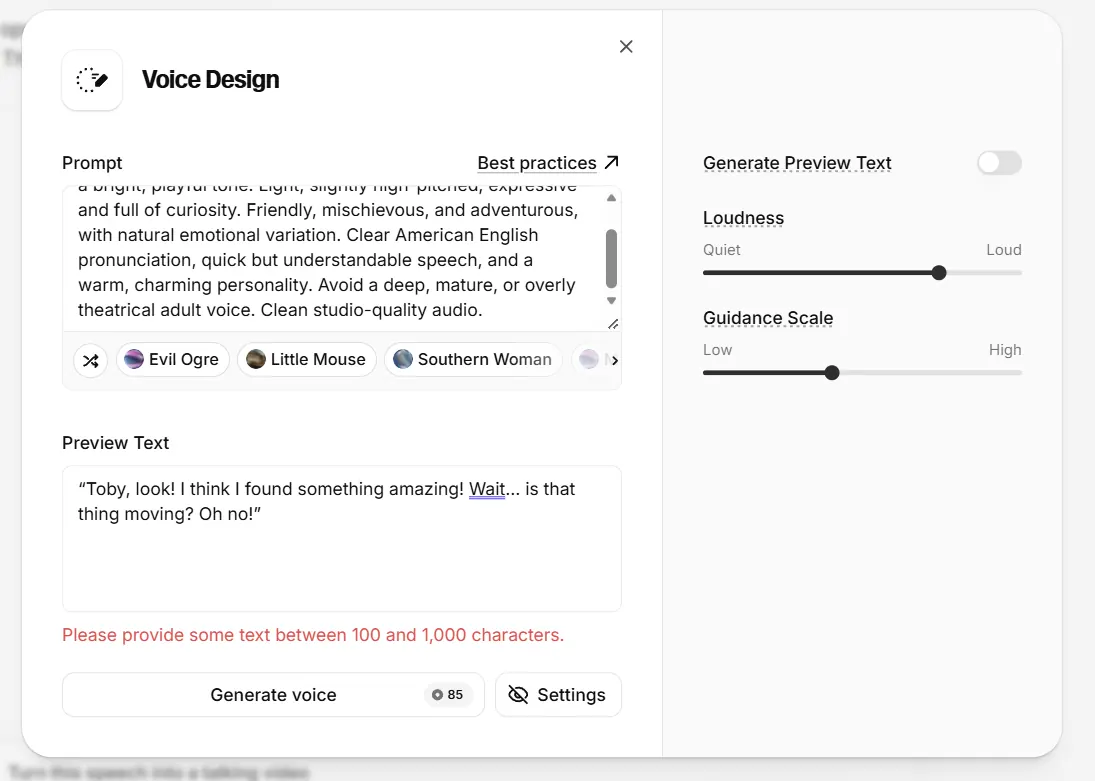
An original animated fantasy character voice with a bright, light, playful tone. Expressive, cheerful, curious, and adventurous. A slightly higher vocal register, lively intonation, warm personality, and clear American English pronunciation. Natural changes in emotion, from excitement and wonder to gentle surprise. Smooth, clean studio-quality audio with a distinctive, friendly character.This is the successful prompt preserved in the share link. An earlier request describing a youthful male cartoon character was rejected with a prohibited-use warning, and the interface indicated no charge. The exact blocked wording was not preserved in this article, and ElevenLabs did not identify the cause. The screenshot below contains a different description, but its place in the editing sequence is not verified.
Step 2: Set a meaningful preview script
We disabled Generate Preview Text and entered our own dialogue. The interface required between 100 and 1,000 characters. Our first short line failed that validation, so we expanded it to include excitement, hesitation, curiosity and surprise.
Exact preview script
Toby, look! I think I found something amazing! Wait... is that thing moving? Oh no! Toby, come here! I have a brilliant idea! What if we give it a little water? Maybe it will grow into the biggest flower on our planet! Wow, this is going to be awesome!A preview with multiple emotional beats is more revealing than a single greeting. Listen for whether the voice stays recognizable when it changes volume or tone. This is also why a preview written for your actual content is preferable to a generic sample.
Step 3: Generate candidates and choose for the role
The successful request returned three playable options. We listened to them and chose Voice 3. The editor’s reaction was positive: it sounded lively and appealing, but seemed more suitable for a female cartoon character than for the original male character concept. This is an important practical lesson: a voice can sound good yet be wrong for the casting brief.
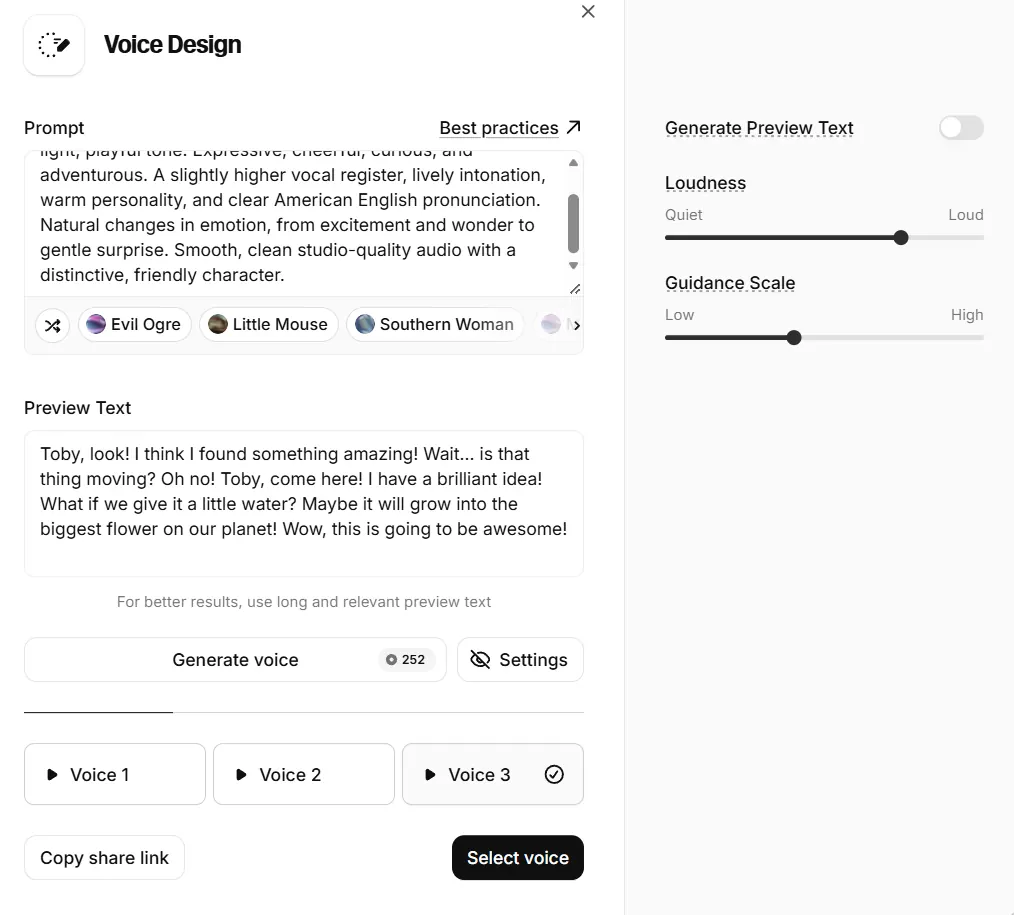
We did not preserve separate downloadable audio for Voice 1 and Voice 2. Consequently, this article does not pretend to offer an objective three-way audio ranking. The share link preserves the successful prompt and settings: Open the recorded Voice Design configuration. This link may require an ElevenLabs login and does not itself contain downloadable audio.
Step 4: Save the voice and generate real speech
After selecting Voice 3, we saved it as Zuri – Female Character Test, opened Generate speech. The TTS screenshot shows Language: Auto, not a manually selected English setting. The interface confirmed that the saved voice was ready for use. We then used Eleven v4 to render a short line with emotional cues.
Exact follow-up speech text
Toby, look! I found something amazing! [excited] It's glowing! Do you think it's magic? [curious] Wait... did it just move? [surprised] Oh! Maybe we should be careful. [whispers] Let's take a closer look!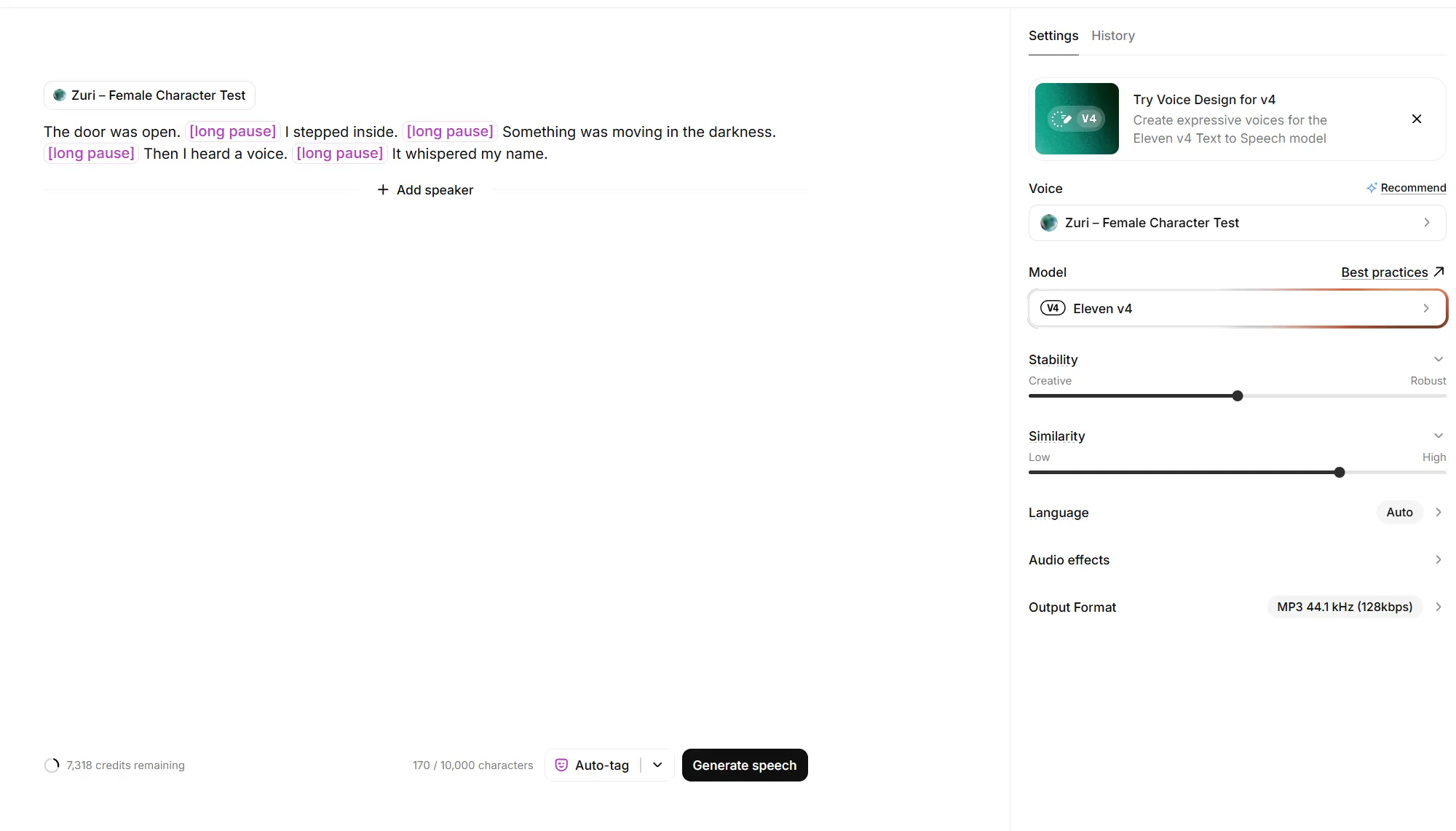
The TTS screenshot shows approximate Stability (40%) and Similarity (80%) slider positions; we did not record exact numerical settings or run a comparison. The audio above is the exported result. Emotional tags were part of the input, but we did not isolate each tag’s causal effect in this test.
What worked — and what did not
Worked: the revised prompt generated three options, the selected voice saved successfully, and the saved voice produced an actual MP3 with the requested dialogue. The editor liked the result enough to consider it for a cartoon character.
Did not work as intended: the first prompt was blocked; the first preview script was too short; and the preferred voice did not match the originally intended character as closely as hoped. We cannot conclude from one successful clip that the voice will remain consistent over long narration, different accents, or every emotional style.
Troubleshooting: four problems you may hit
The preview text is rejected
Check the character count shown in the interface. Our session required 100–1,000 characters. Add useful sentences with contrasting emotions rather than padding the script with meaningless text.
The prompt is blocked
Read the provider’s warning and policies. Rework the request toward a genuinely original fictional voice and remove unnecessary personal or age-related specifications. Do not attempt to impersonate an identifiable person or repeatedly circumvent a policy rejection.
The voice is good but wrong for the character
Do not judge quality and suitability as the same thing. Compare the voice against the role: personality, vocal register, emotional range and consistency. Keep a promising alternate for a different character, as we did.
The preview sounds better than the final narration
Keep the exact test sentence, voice, model and settings documented. Test a short dialogue with the saved voice before committing to a long production. A preview is a casting audition, not proof that every later line will sound identical.
Credits, licensing and publication
The interface displayed 252 credits beside Generate voice for the successful request. The preview text is 252 characters long, consistent with ElevenLabs’ documented per-character charging model for Voice Design. We have a screenshot of that displayed estimate, but not a complete before-and-after credit ledger for the design and follow-up TTS steps; therefore we do not state an exact total spend. Prices, available models, and credit rules can change. Check your own account before generating.
Voice ownership, permitted use, and commercial publishing rights depend on ElevenLabs’ current terms and the account plan. Verify the applicable conditions before using generated speech in monetized videos, advertisements or client projects. For current details, consult Voice Design documentation and ElevenLabs terms. The account plan used in this session was not documented. The audio here is an original test asset, not a sample of a real person being cloned.
Model limitation: ElevenLabs notes that Voice Design voices can be less performative on Eleven v4 than on earlier models. Our single clip cannot establish how much this affects other voices or scripts.
More related guides are available in our AI Voice section.
Our verdict
Voice Design v4 is worth exploring when you need a distinctive fictional character voice without recording a human voice. In our one documented session, it produced a usable saved voice and a real speech clip, although the best candidate suited a different character than expected. The most repeatable lesson is to test voices with dialogue that resembles your actual project, keep exact prompts and settings, and judge casting fit separately from overall sound quality.
Method note: Screenshots show the real application screens from our session. The featured image is an editorial illustration. No claims about multiple independent runs, measured success rates, or direct comparisons with other services are made.