

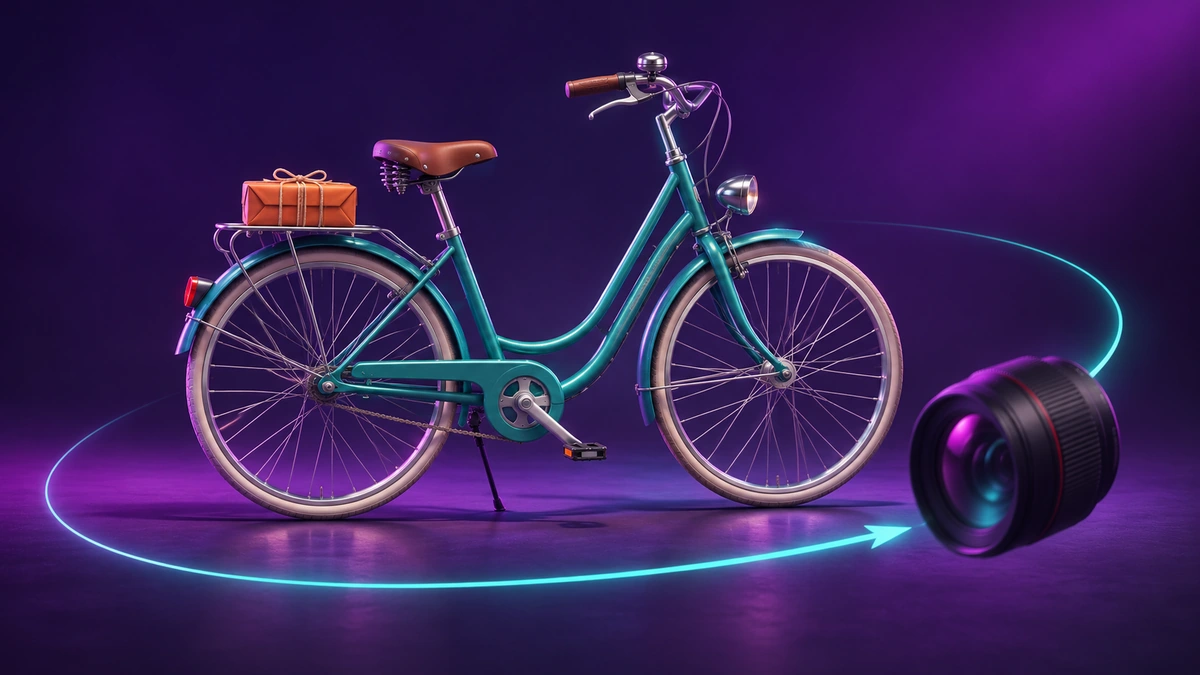
To change the camera angle in a ChatGPT image, describe where the camera moves and what becomes visible. “Low angle” is a starting label. “Camera just above the pavement, showing the underside of the rear rack” gives you something specific to inspect.
We created one bicycle scene and used that original image as the reference for seven new views. Below are eight complete prompts, the actual selected images and the changes we observed. The front view needed a second attempt. These examples show useful perspective changes, but they also show that a reference does not lock every component or background detail.
These are static pictures. If you need movement between viewpoints, use our separate AI video camera movement guide.
Use the same reference for every new view
- Create or choose a source with a clear subject, simple surroundings and visible landmarks. Here, the teal bicycle, orange parcel, green door and plant make the scene easy to compare.
- Attach that same source for each angle request. Avoid a chain where the next image depends on the previous edit: changes can accumulate.
- State what stays parked, then describe the camera position and visible surfaces. Name the background relationship as well as the subject.
- Check perspective before polishing colors. A rotated bicycle against an unchanged facade is a different result from moving around a parked bicycle.
You can upload the source image and request a new view in ChatGPT. See OpenAI’s image help for its current creation and editing workflow. Hidden surfaces will be inferred, so this method cannot document the exact reverse side of a real product.
Eight views and the prompts behind them
The first card is the generated source. For cards 2–8, attach that first image before using the prompt. The observations describe our actual outputs, not a promise that your next generation will match them.
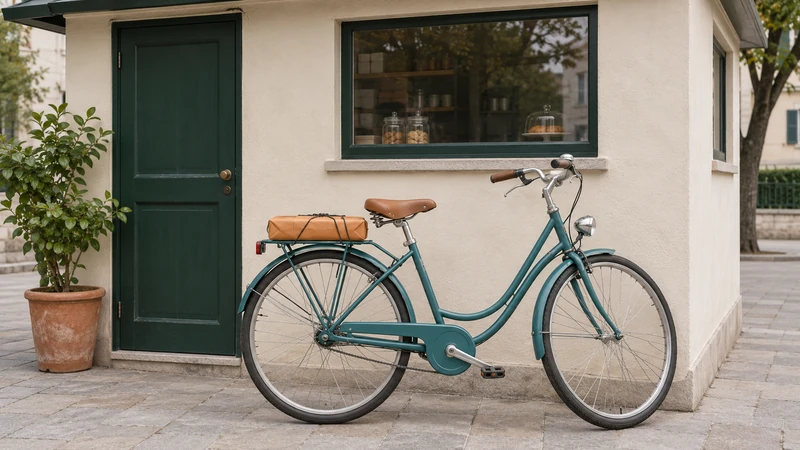
1. Eye-level reference
Observed result: The reference shows both wheel circles and the bicycle's left side. It is already close to a profile; its main role is to supply the same starting image to each later request.
FULL PROMPT
Create a realistic editorial photograph of one original teal step-through city bicycle parked parallel to the front wall of a small cream kiosk. The bicycle's front wheel points toward the kiosk's right-hand corner. It has two complete round wheels, a tan saddle, black tires, a single orange rectangular parcel strapped flat on its rear rack, a small round silver headlamp, and no visible brand lettering. The kiosk has one closed dark green door and one rectangular window; a terracotta pot with a green plant stands beside the door. Quiet pale stone pavement, soft overcast daylight, no people, no text or logos. Camera at the bicycle frame's height, looking across the street toward the bicycle's left side in a mild front three-quarter view. Show the entire bicycle and parcel with clear margins, including both wheels and the pavement under them. Horizontal 16:9. Natural perspective and restrained colors, sharp subject, no decorative frame or watermark.
Practical tip: A neutral baseline makes the later camera changes easier to judge.
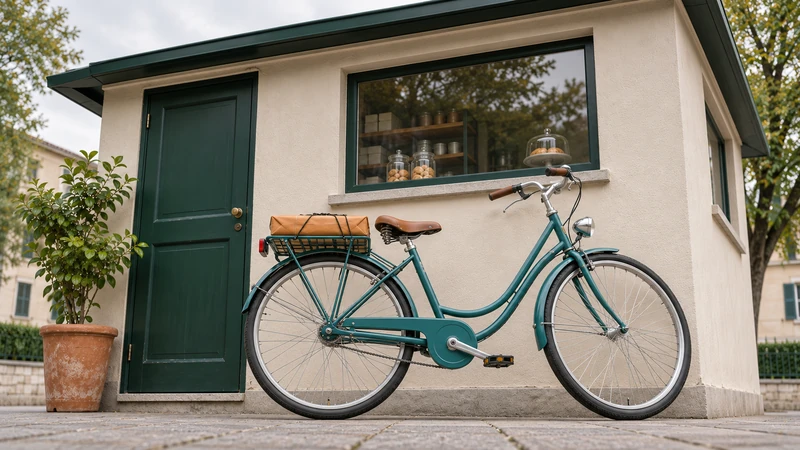
2. Low angle
Observed result: The camera is lower: the underside of the rack is visible, with upward-looking facade lines. Small mechanical details differ from the reference, so this is not a mechanically exact reconstruction.
FULL PROMPT
Using the attached source image as the scene reference, create one new realistic photograph of the same parked teal step-through bicycle, tan saddle, orange parcel on the rear rack, cream kiosk, dark green door, window and terracotta plant pot. Keep their physical positions and design as close to the reference as possible. The bicycle stays parked and points in the same world direction; move the camera rather than rotating the bicycle. Soft overcast daylight, no people, no lettering or logos. Horizontal 16:9, entire bicycle and parcel within the frame with generous margins, no watermark or border. Place the camera just above the pavement, below the bicycle's crank, looking upward from the street side toward the bicycle and kiosk. The kiosk roofline rises behind the bicycle; the underside of the rack and parcel should be more visible, with less of the top of the saddle visible. Keep both wheels complete.
Practical tip: Name what becomes visible underneath the subject instead of relying only on the words low angle.
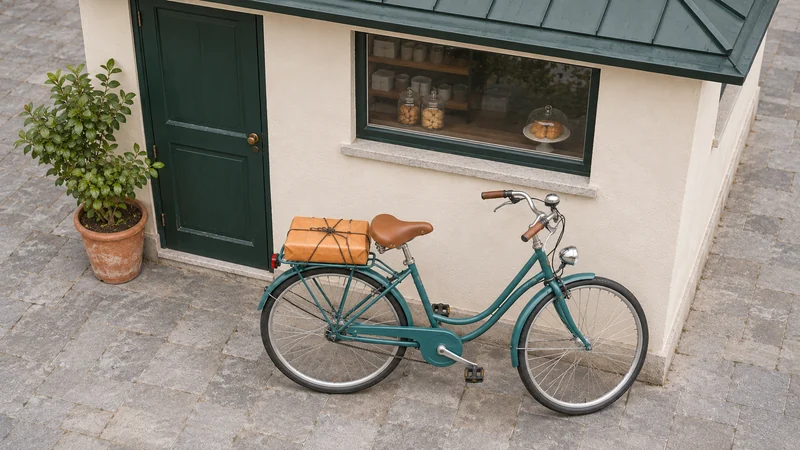
3. High angle
Observed result: The parcel and saddle top surfaces are prominent, and more pavement is visible. The kiosk roof is also newly visible; its hidden geometry is inferred by the generator.
FULL PROMPT
Using the attached source image as the scene reference, create one new realistic photograph of the same parked teal step-through bicycle, tan saddle, orange parcel on the rear rack, cream kiosk, dark green door, window and terracotta plant pot. Keep their physical positions and design as close to the reference as possible. The bicycle stays parked and points in the same world direction; move the camera rather than rotating the bicycle. Soft overcast daylight, no people, no lettering or logos. Horizontal 16:9, entire bicycle and parcel within the frame with generous margins, no watermark or border. Raise the camera well above the bicycle, looking down at roughly 55 degrees from the same street side. Show the top of the orange parcel, saddle and handlebars, with more pavement and less vertical kiosk facade. This is an oblique downward view, not a directly overhead flat lay.
Practical tip: Top surfaces should become more visible; a larger subject alone is not a high angle.
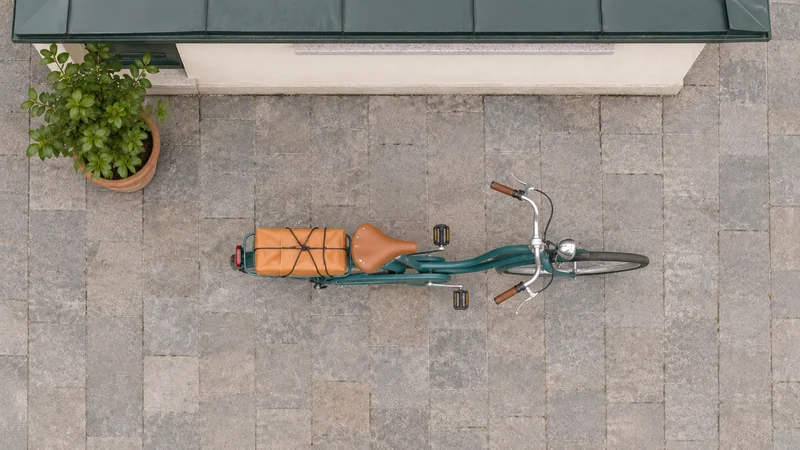
4. Directly overhead
Observed result: The viewpoint becomes nearly vertical: the bicycle narrows and the door and window disappear. The parcel hides much of the rear wheel. This is a useful overhead interpretation, not evidence of the object's exact unseen construction.
FULL PROMPT
Using the attached source image as the scene reference, create one new realistic photograph of the same parked teal step-through bicycle, tan saddle, orange parcel on the rear rack, cream kiosk, dark green door, window and terracotta plant pot. Keep their physical positions and design as close to the reference as possible. The bicycle stays parked and points in the same world direction; move the camera rather than rotating the bicycle. Soft overcast daylight, no people, no lettering or logos. Horizontal 16:9, entire bicycle and parcel within the frame with generous margins, no watermark or border. Place the camera vertically above the bicycle and look straight down at 90 degrees. The bicycle reads as a narrow shape with wheels aligned along its length; the tops of the parcel, saddle and handlebars are visible. Only the kiosk roof edge or wall boundary should appear near the top of the composition, rather than a front-facing view of its door and window. Show ample pavement around the whole bicycle.
Practical tip: A true top-down view changes the background geometry as well as the subject.
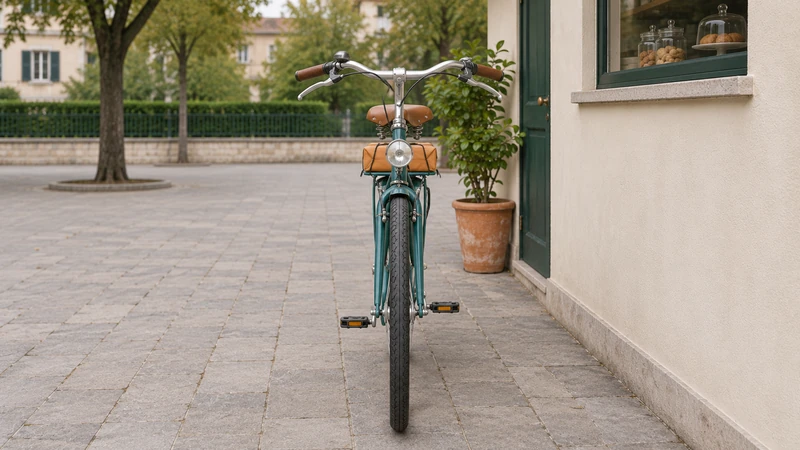
5. Front view
Observed result: The first attempt remained three-quarter. A second request explicitly aligned the wheel centerlines; the selected result is head-on with almost complete wheel overlap. Some background details and the plant's apparent placement changed.
FULL PROMPT
Using the attached source image as the scene reference, create one new realistic photograph of the same parked teal step-through bicycle, tan saddle, orange parcel on the rear rack, cream kiosk, dark green door, window and terracotta plant pot. Keep their physical positions and design as close to the reference as possible. The bicycle stays parked and points in the same world direction; move the camera rather than rotating the bicycle. Soft overcast daylight, no people, no lettering or logos. Horizontal 16:9, entire bicycle and parcel within the frame with generous margins, no watermark or border. Move the camera to a position directly beyond the bicycle's front wheel, looking backward along the bicycle's length toward its rear wheel. The front tire, headlamp and handlebar are nearest and approximately centered; the rear wheel is partly hidden behind the front wheel. The kiosk recedes along one side. Do not turn the bicycle to face a camera still standing across the street. Critical alignment: make a true head-on front elevation. The front and rear wheel centerlines must overlap, with the rear tire hidden almost entirely behind the front tire. Both handlebar grips appear symmetrically on either side. Move to the exact line of the bicycle, not another three-quarter position.
Practical tip: Look for front-to-rear wheel overlap and the background receding along the frame.
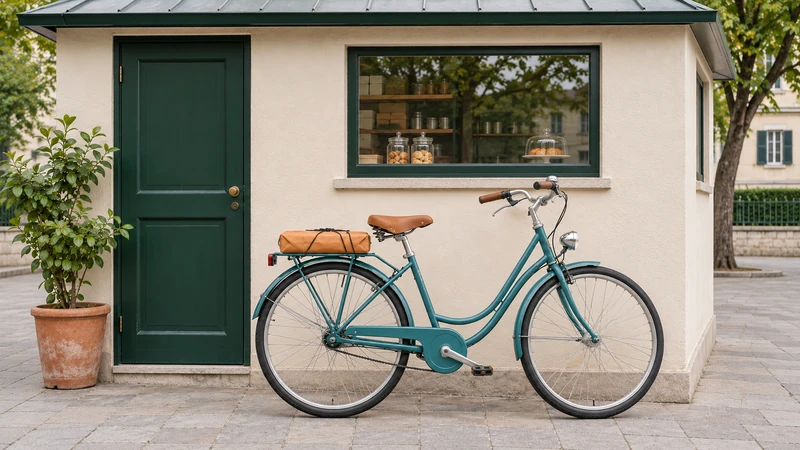
6. Strict side view
Observed result: The wheels have similar apparent size and the frame is broadside. Compared with the baseline, the change is deliberately modest; use it to distinguish a neutral reference from a stricter profile.
FULL PROMPT
Using the attached source image as the scene reference, create one new realistic photograph of the same parked teal step-through bicycle, tan saddle, orange parcel on the rear rack, cream kiosk, dark green door, window and terracotta plant pot. Keep their physical positions and design as close to the reference as possible. The bicycle stays parked and points in the same world direction; move the camera rather than rotating the bicycle. Soft overcast daylight, no people, no lettering or logos. Horizontal 16:9, entire bicycle and parcel within the frame with generous margins, no watermark or border. Move the camera to the street side exactly perpendicular to the bicycle's frame. Show a clean left-side profile with the two wheel circles separated horizontally at equal apparent size, the frame readable, and the cream kiosk facade approximately parallel to the image plane. Keep the bicycle's front wheel toward the kiosk's right-hand corner.
Practical tip: Keep the wheels similar in apparent size to make the side profile read clearly.
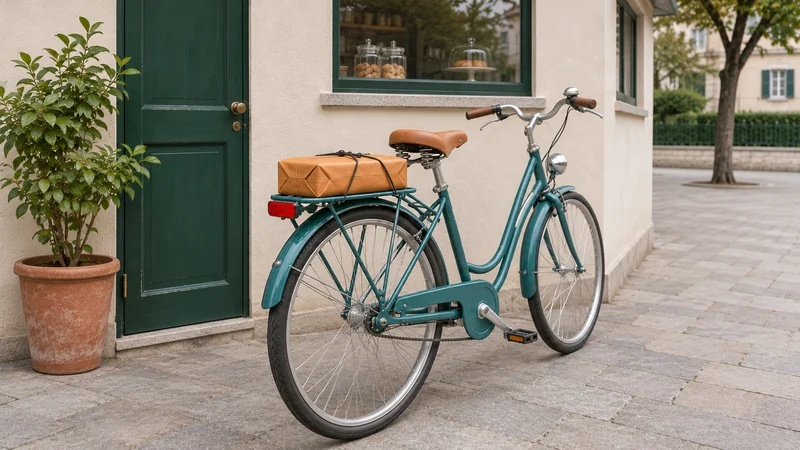
7. Rear three-quarter view
Observed result: The rear wheel and parcel are nearest, while the front wheel recedes. The direction of depth reverses compared with the front view; straps and bicycle components still vary.
FULL PROMPT
Using the attached source image as the scene reference, create one new realistic photograph of the same parked teal step-through bicycle, tan saddle, orange parcel on the rear rack, cream kiosk, dark green door, window and terracotta plant pot. Keep their physical positions and design as close to the reference as possible. The bicycle stays parked and points in the same world direction; move the camera rather than rotating the bicycle. Soft overcast daylight, no people, no lettering or logos. Horizontal 16:9, entire bicycle and parcel within the frame with generous margins, no watermark or border. Move the camera around the parked bicycle to a position behind its rear wheel, angled about 35 degrees off its centerline. The orange parcel and rear rack are nearest; the rear wheel appears larger than the front wheel, which recedes toward the kiosk's right-hand corner. Show the rear face of the parcel, with the kiosk facade receding to the side. Keep the whole bicycle visible.
Practical tip: The rear rack should become the near end; a mirrored side view is not enough.
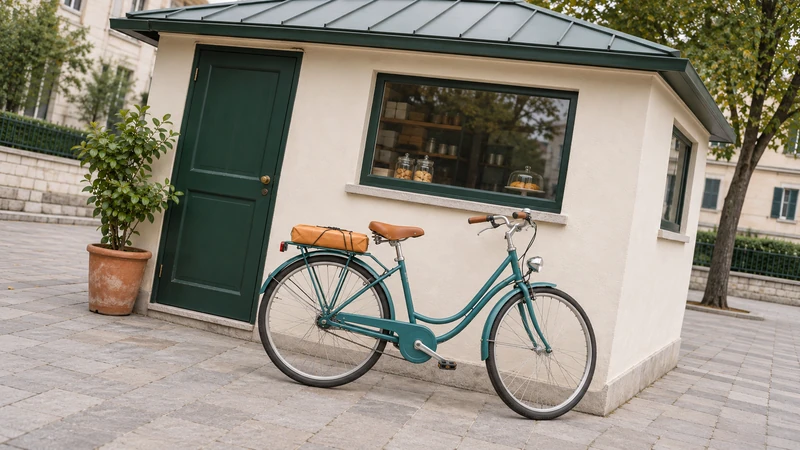
8. Dutch tilt
Observed result: The door frame, roof and pavement tilt together while the bicycle remains upright within the scene. The entire view is regenerated, so it is not a pixel-identical rotation of the source.
FULL PROMPT
Using the attached source image as the scene reference, create one new realistic photograph of the same parked teal step-through bicycle, tan saddle, orange parcel on the rear rack, cream kiosk, dark green door, window and terracotta plant pot. Keep their physical positions and design as close to the reference as possible. The bicycle stays parked and points in the same world direction; move the camera rather than rotating the bicycle. Soft overcast daylight, no people, no lettering or logos. Horizontal 16:9, entire bicycle and parcel within the frame with generous margins, no watermark or border. Keep approximately the source image's camera position, height and subject view, but roll the camera clockwise by about 15 degrees. The kiosk's door frame and pavement lines must tilt together in the image. The bicycle is still upright in the physical scene, not falling over. Use a slightly wider view so neither wheel nor parcel is cut off.
Practical tip: A Dutch tilt rolls the whole scene. Tilting only the bicycle changes the scene rather than the camera.
Angle, framing and camera roll are different controls
Angle changes the direction from which you see an object: from above, below, in front or behind. Framing changes how much of the scene fits. A close crop of the source is not a new viewpoint. Camera roll tilts the entire image plane; that is why the Dutch-tilt example changes the kiosk lines along with the bicycle.
Likewise, a high angle is not automatically a directly overhead view. Our oblique high view shows part of the facade, while the top-down result mostly shows pavement and the roof edge. Those background changes are useful evidence when judging a prompt.
What the front-view retry taught us
The initial front prompt produced another three-quarter view. We added a concrete alignment rule: the front and rear wheel centerlines should overlap, with both handlebar grips visible symmetrically. The selected second result follows that geometry much more closely.
This was one targeted retry, not a measured success rate. It suggests a practical next step when an angle request is vague: describe occlusion and alignment. For a person, that could mean one ear visible and the far shoulder partly hidden. For a box, it could mean the top face visible while the underside is hidden.
When the scene changes along with the camera
Our bicycle stays recognizable across the set, but straps, components, the apparent position of the pot and small background features vary. Do not use these examples as proof of exact object preservation. For identity-led projects, start with our character consistency guide; for small edits that spread further than intended, see why ChatGPT changes the whole image.
If a bicycle suddenly faces the opposite direction or the kiosk landmarks move inconsistently, return to the original source. Ask for one simpler change and name which objects must stay fixed in the scene. Do not try to rescue a broken layout by adding unrelated lens specifications or realism adjectives.
Keep framing problems separate. If the new viewpoint is useful but a wheel is cut off, request a wider view with space under both tires. Our aspect-ratio guide covers expanding the frame without intentionally cropping the subject.
Production notes
AI Revolution generated the source and all examples directly in ChatGPT on 27 November 2026. There were nine scene-generation attempts: one source, seven angle variations and one additional front-view attempt. Each variation referenced the original source independently. A separate generation produced the conceptual cover. We reviewed the selected results and resized the complete scenes to 800 × 450 WebP without cropping. The tool did not expose an exact model identifier or a per-image credit cost.
Use these prompts as viewpoint briefs. Judge the visible surfaces, overlap and background perspective first; then keep the version that communicates your intended angle.