

A cartoon prompt needs more direction than “make it cute.” Thick ink outlines, dry chalk marks and smooth 3D surfaces can describe the same subject while producing very different images. Choosing those visible details makes the request easier to judge and revise.
This guide gives you 10 AI cartoon styles with complete ChatGPT prompts. Each uses one fixed scene: a teal delivery robot holding an orange parcel outside a small storefront. The goal is to choose an illustration style for your own character or story. All prompts request a single static picture.
For broader transformations such as glass, gold and miniature worlds, see our 30 ChatGPT image style prompts. Here, the focus is narrower: how line, shading, texture and shape change a cartoon scene.
Start with the scene, then choose the rendering style
Keep the subject and action simple while comparing looks. Our robot has a rounded square head, a cream face panel, two dark oval eyes and short legs. It holds one orange parcel in both hands. The setting contains one storefront and one potted plant.
The prompts keep those details and the horizontal framing fixed. Only the description of how the scene should be drawn changes. Independently generated pictures can still vary in pose, proportions and background placement; a repeated text description does not lock an exact character design.
If you already have a character, attach a clean reference image and describe the features that matter. For a longer project, first create a character reference sheet. Treat these prompts as art directions, not preset filters that preserve every source pixel.
How to use the prompts in ChatGPT
- Choose one style. Copy its complete prompt into ChatGPT and ask it to create the image. The prompts work as standalone scene briefs and do not require an uploaded photo.
- Generate one picture. Avoid asking for all ten styles in a contact sheet when you need ten usable files. A separate image gives each scene its own composition and resolution.
- Inspect the defining feature. For chalk, check for granular strokes; for paper, check for flat sheet edges. A style name alone is not a useful quality check.
- Adapt the subject after choosing the look. Replace the robot description with your character, then keep the material and shading directions intact. Change one part at a time so you can judge what helped.
OpenAI’s image guide explains creating and editing images in ChatGPT and requesting an aspect ratio. Access and generation limits depend on your account. Asking for 16:9 describes the intended framing; check the actual downloaded dimensions before preparing a website image.
How these visual examples were made
AI Revolution created these pictures with ChatGPT’s image-generation tool on 26 November 2026. Each example was generated separately from the full prompt shown below, without an uploaded reference image. There were 12 example-generation attempts: one for each style except flat vector-style, which took three attempts. Its final prompt adds an explicit flat-fill requirement. We also generated a separate conceptual cover.
We reviewed each result visually and resized the complete pictures to 800 × 450 pixels for WebP delivery. These are illustrative style examples, not a controlled character-consistency benchmark. The head shapes, limbs and scene placement vary, and some requests are followed approximately. We flag those differences beside the relevant pictures. The tool did not expose an exact model identifier or per-image credit cost, so neither is reported.
10 cartoon styles and their complete prompts
Each picture below is an original, independently generated static example. The full prompt appears beside its result, followed by a practical tip and a check you can apply to your own version.
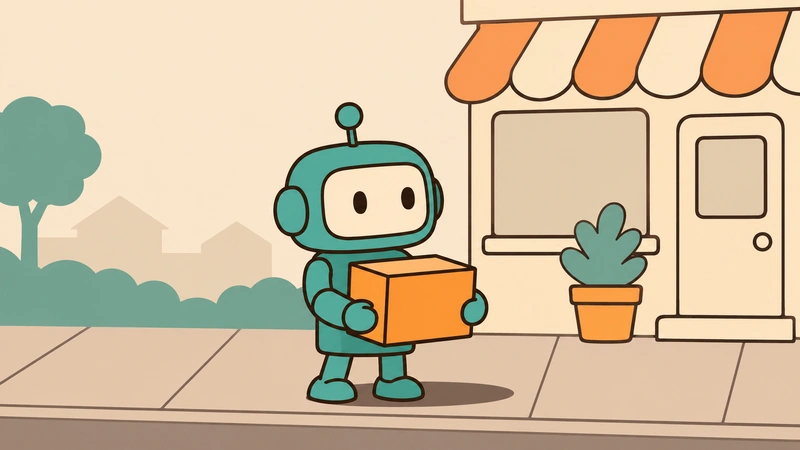
1. Hand-drawn 2D cartoon
Observed result: Rounded ink contours and simplified colors make the character readable, although there is more soft shading than the requested single shadow tone.
The outline carries the expression and the flat shadow gives the body volume without making it look like a rendered toy.
Useful for: Story illustrations and character concepts where a clear pose matters more than surface detail.
FULL PROMPT
Create one original static illustration of a small teal delivery robot carrying a plain orange cardboard parcel in both hands. The robot has a rounded square head, two dark oval eyes, a cream face panel, a short rectangular torso, two arms and two short legs. Show it standing in a three-quarter view on a quiet neighborhood sidewalk, with one simple cream storefront and one potted plant behind it. Keep both feet, both hands and the entire parcel clearly visible. Use an eye-level view and a horizontal 16:9 composition, with generous empty space around the subject. No other characters, lettering, logos, watermark, panel borders or decorative frame. Render the whole scene as a hand-drawn 2D cartoon: confident slightly varied dark outlines, rounded shapes, flat teal, orange and cream colors, and one simple hard-edged shadow tone. Keep the background simplified and flatter than the character. No glossy surfaces, realistic reflections or photographic textures.
Practical tip: If it looks like shiny 3D, replace vague words such as cinematic with flat cel colors, visible ink outlines and one hard shadow tone.
What to check: Look for a drawn contour around the parcel and feet; soft reflective highlights would weaken this direction.
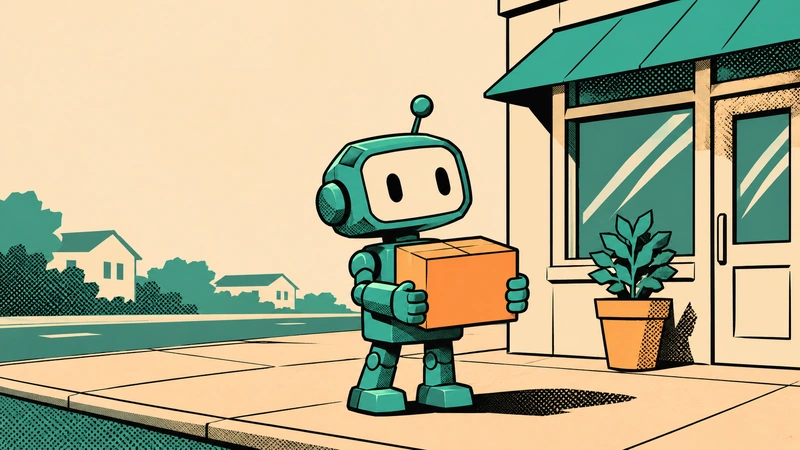
2. Comic-book art
Observed result: Heavy ink contours and halftone shadows are visible on the robot and pavement. The complete box remains clear and there is no speech text.
Black shadow shapes and small halftone areas create a printed comic feel. This should have more graphic contrast than the softer 2D version.
Useful for: A dramatic character reveal, a story illustration or an editorial visual with a strong silhouette.
FULL PROMPT
Create one original static illustration of a small teal delivery robot carrying a plain orange cardboard parcel in both hands. The robot has a rounded square head, two dark oval eyes, a cream face panel, a short rectangular torso, two arms and two short legs. Show it standing in a three-quarter view on a quiet neighborhood sidewalk, with one simple cream storefront and one potted plant behind it. Keep both feet, both hands and the entire parcel clearly visible. Use an eye-level view and a horizontal 16:9 composition, with generous empty space around the subject. No other characters, lettering, logos, watermark, panel borders or decorative frame. Render the whole scene as an original comic-book illustration: bold black ink contours, expressive angular shapes, strong blocks of shadow, a limited teal, orange and cream palette, and restrained printed halftone dots inside the shadows. Use a single open composition, not a page of panels. No speech balloons, captions or onomatopoeia.
Practical tip: Keep halftone dots inside a few shadow areas. Covering every surface with dots can obscure the eyes and hands when the image is reduced.
What to check: Check that the scene is one picture and the model has not added text, speech balloons or a comic-strip border.
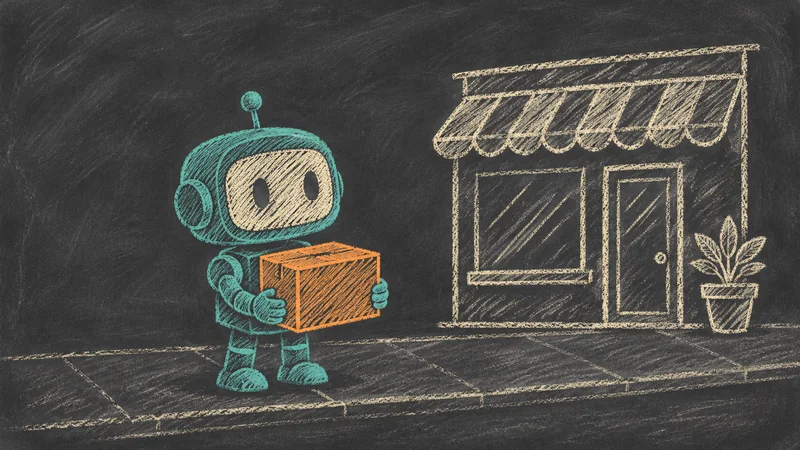
3. Chalkboard drawing
Observed result: The robot, parcel and storefront are all described with grainy chalk strokes. The face and background stay part of the drawing rather than becoming solid objects in front of a board.
The board is the image surface, with granular colored marks describing everything in the scene.
Useful for: Educational illustrations or informal explanatory visuals with a handmade classroom feel.
FULL PROMPT
Create one original static illustration of a small teal delivery robot carrying a plain orange cardboard parcel in both hands. The robot has a rounded square head, two dark oval eyes, a cream face panel, a short rectangular torso, two arms and two short legs. Show it standing in a three-quarter view on a quiet neighborhood sidewalk, with one simple cream storefront and one potted plant behind it. Keep both feet, both hands and the entire parcel clearly visible. Use an eye-level view and a horizontal 16:9 composition, with generous empty space around the subject. No other characters, lettering, logos, watermark, panel borders or decorative frame. Render every part of the scene as a colored chalk drawing on one dark charcoal classroom chalkboard. Use dry granular chalk marks, gently broken contours and subtle erased chalk traces. Teal chalk defines the robot, orange chalk defines the parcel, and cream chalk defines the face and storefront. Simplify filled regions into chalk hatching. The drawing itself is the subject; do not show a physical robot standing in front of a board.
Practical tip: Say that the entire scene is drawn on the board. Otherwise you may get a three-dimensional robot with a chalkboard behind it.
What to check: The robot, parcel and storefront should share the same chalk texture, with no glossy solid objects.
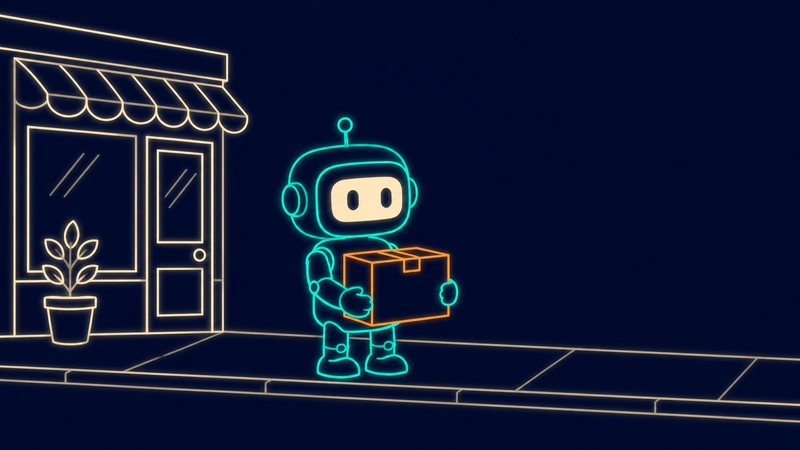
4. Glowing-line sketch
Observed result: The teal and orange contours read against the dark background. The cream face panel is more filled than the requested mostly dark interiors.
Light outlines define the objects while dark interiors keep the picture airy. The glow should support the line rather than blur it.
Useful for: Technology-themed illustrations and dark-background presentation visuals.
FULL PROMPT
Create one original static illustration of a small teal delivery robot carrying a plain orange cardboard parcel in both hands. The robot has a rounded square head, two dark oval eyes, a cream face panel, a short rectangular torso, two arms and two short legs. Show it standing in a three-quarter view on a quiet neighborhood sidewalk, with one simple cream storefront and one potted plant behind it. Keep both feet, both hands and the entire parcel clearly visible. Use an eye-level view and a horizontal 16:9 composition, with generous empty space around the subject. No other characters, lettering, logos, watermark, panel borders or decorative frame. Render the scene entirely as a luminous line drawing on a deep midnight-blue background. Use crisp thin teal contours for the robot, warm orange contours for the parcel, and dim cream contours for the storefront and plant. Add a narrow restrained halo around each contour while keeping the central line sharp. Leave the interiors mostly dark. No solid metal surfaces, photorealism, broad light fog or futuristic city.
Practical tip: Use luminous line drawing with dark interiors to distinguish this from a normal robot scene lit by neon signs.
What to check: The parcel needs a complete readable outline, and the glow should not merge the fingers into the box.

5. Flat vector-style illustration
Observed result: Clean geometric shapes and an outline-free treatment come through. Three attempts reduced the unwanted texture, but subtle tonal variation remains; this is a vector-style raster illustration, not perfectly uniform vector artwork.
Closed shapes and clean color boundaries do the work. Unlike the first style, this version deliberately avoids ink contours.
Useful for: A starting visual for app onboarding, presentation slides or a simple mascot concept.
FULL PROMPT
Create one original static illustration of a small teal delivery robot carrying a plain orange cardboard parcel in both hands. The robot has a rounded square head, two dark oval eyes, a cream face panel, a short rectangular torso, two arms and two short legs. Show it standing in a three-quarter view on a quiet neighborhood sidewalk, with one simple cream storefront and one potted plant behind it. Keep both feet, both hands and the entire parcel clearly visible. Use an eye-level view and a horizontal 16:9 composition, with generous empty space around the subject. No other characters, lettering, logos, watermark, panel borders or decorative frame. Render the scene as a flat vector-style editorial illustration made from clean closed geometric shapes and a restrained teal, orange, cream and dark navy palette. Use solid color fills, consistent rounded corners and simple overlapping shapes to show depth. No outlines, gradients, texture, reflections, 3D shading or cast shadows. Preserve a clear separation between the robot's hands and the parcel. Strict finish requirement: every region must be a single uniform solid color from the four-color palette. Completely smooth flat fills. Absolutely no paper grain, mottling, shading, vignettes or color gradients anywhere, including the background. Treat this as clean SVG-like artwork rendered to a raster image.
Practical tip: Request a vector-style appearance, but check the actual download format. An AI-generated PNG or WebP is still a raster image, not editable SVG artwork.
What to check: The arms and box must remain separate shapes; an outline-free image can lose their boundaries if the colors match.
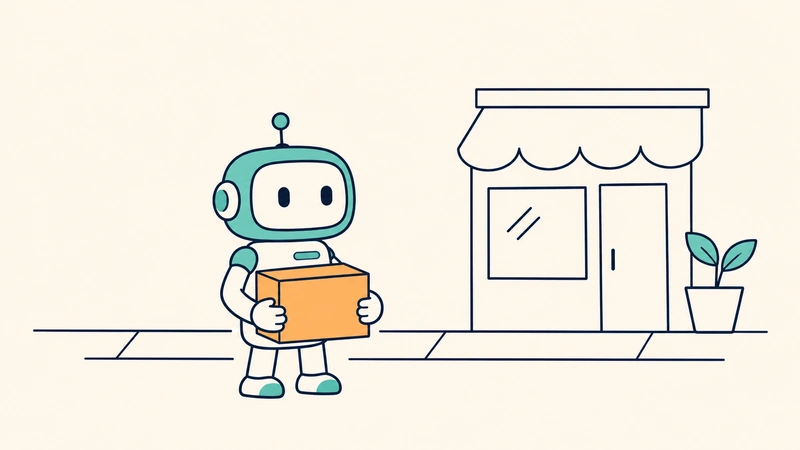
6. Minimal line art
Observed result: Sparse navy contours and large blank areas separate this from the full-color versions. The orange parcel remains the main accent, with a little more teal fill than a pure line-only drawing.
A few contours communicate the pose, with the orange parcel acting as the main color accent.
Useful for: Quiet blog illustrations, simple instructional visuals or early identity sketches.
FULL PROMPT
Create one original static illustration of a small teal delivery robot carrying a plain orange cardboard parcel in both hands. The robot has a rounded square head, two dark oval eyes, a cream face panel, a short rectangular torso, two arms and two short legs. Show it standing in a three-quarter view on a quiet neighborhood sidewalk, with one simple cream storefront and one potted plant behind it. Keep both feet, both hands and the entire parcel clearly visible. Use an eye-level view and a horizontal 16:9 composition, with generous empty space around the subject. No other characters, lettering, logos, watermark, panel borders or decorative frame. Render the scene as spare editorial line art on a warm cream background. Use a consistent thin dark navy contour, a few small teal accents on the robot, and one flat orange parcel shape. Describe the face, hands, feet, storefront and plant with as few deliberate strokes as possible. Leave large areas blank. No hatching, gradients, surface texture, filled background or 3D lighting.
Practical tip: Minimal should mean fewer marks, not missing anatomy. Keep the instruction to show both hands and feet.
What to check: At a small size, you should still be able to tell where each hand touches the parcel.
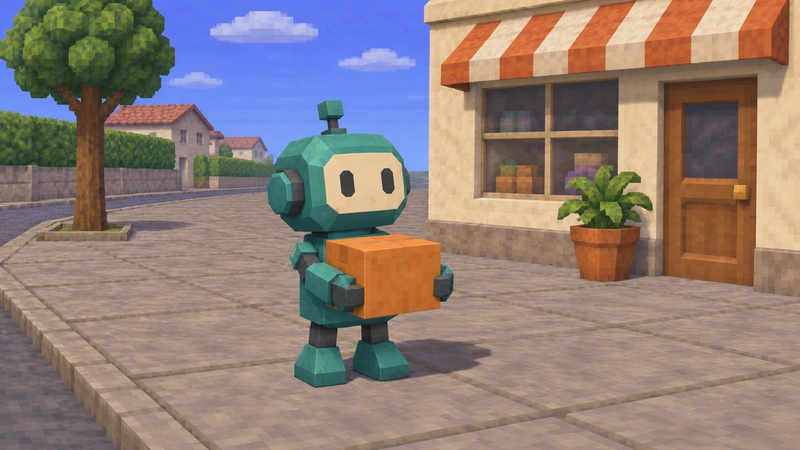
7. Retro game 3D / PS2-era look
Observed result: The head, hands and feet have visible facets, with blocky textures across the storefront. This is an invented retro-game look, not an actual console capture.
Angular geometry, simple textures and restrained lighting suggest an older game asset. A vintage filter alone does not create this look.
Useful for: A retro game concept image or a nostalgic visual direction for an original character.
FULL PROMPT
Create one original static illustration of a small teal delivery robot carrying a plain orange cardboard parcel in both hands. The robot has a rounded square head, two dark oval eyes, a cream face panel, a short rectangular torso, two arms and two short legs. Show it standing in a three-quarter view on a quiet neighborhood sidewalk, with one simple cream storefront and one potted plant behind it. Keep both feet, both hands and the entire parcel clearly visible. Use an eye-level view and a horizontal 16:9 composition, with generous empty space around the subject. No other characters, lettering, logos, watermark, panel borders or decorative frame. Render the scene as an original early-2000s console-game screenshot aesthetic: visibly low-polygon character geometry, angular hands and feet, simple low-resolution painted textures, modest texture detail and basic baked-looking lighting. Retain the teal robot, orange parcel and cream storefront. Present the image cleanly without a console border, HUD, scanlines, motion blur or invented game title. Avoid modern glossy physically based rendering.
Practical tip: Specify the geometry and textures. Asking only for PS2 style can leave the model free to add unrelated interface graphics or modern effects.
What to check: Inspect the hands, head corners and feet for visible facets. This is an aesthetic interpretation, not a screenshot from a real game.
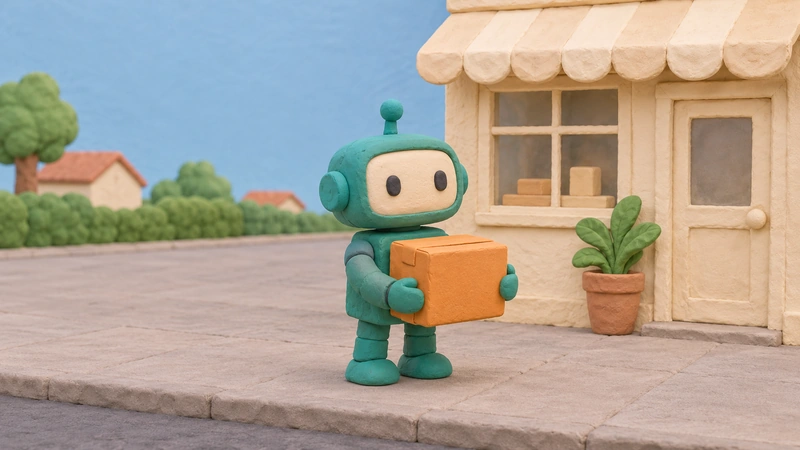
8. Handmade clay
Observed result: The robot, parcel and storefront share a softly pressed material with small surface irregularities. The body and parcel stay sharp while the distant background softens.
Pressed surfaces, soft seams and slightly irregular edges suggest a physical model made by hand.
Useful for: A tactile character concept or a warm, playful story illustration.
FULL PROMPT
Create one original static illustration of a small teal delivery robot carrying a plain orange cardboard parcel in both hands. The robot has a rounded square head, two dark oval eyes, a cream face panel, a short rectangular torso, two arms and two short legs. Show it standing in a three-quarter view on a quiet neighborhood sidewalk, with one simple cream storefront and one potted plant behind it. Keep both feet, both hands and the entire parcel clearly visible. Use an eye-level view and a horizontal 16:9 composition, with generous empty space around the subject. No other characters, lettering, logos, watermark, panel borders or decorative frame. Render the scene as a photograph-like still of a handmade clay miniature set. Build the teal robot from softly pressed modeling clay with subtle fingerprints, rounded seams and slightly uneven edges. Make the orange parcel, cream storefront and plant from the same tactile handmade material. Use gentle studio illumination and enough depth of field to keep the complete robot and parcel sharp. No polished plastic, metallic reflections or motion blur.
Practical tip: Ask for subtle fingerprints and seams. Too many dents can make the character look damaged rather than handmade.
What to check: The parcel and background should belong to the same miniature material world. This is a static clay-look image, not evidence of stop-motion production.
9. Layered paper cutout
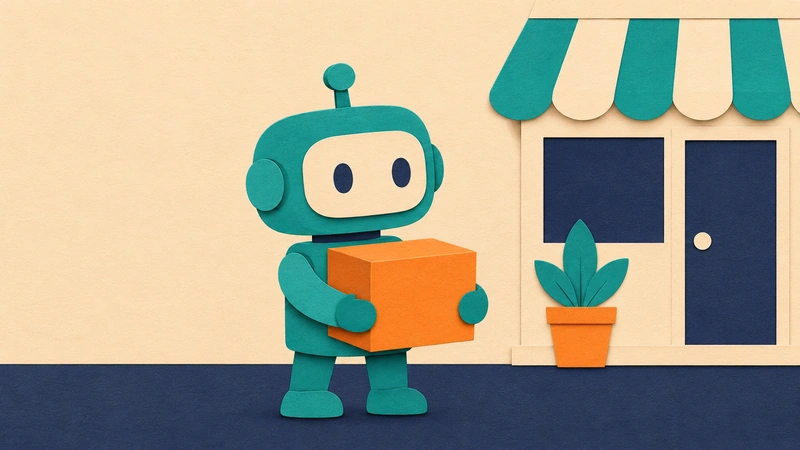
Observed result: Distinct paper edges and small overlap shadows are visible around the face, arms and storefront. The parcel uses shaded paper planes to suggest a box rather than looking entirely flat.
Flat cut shapes overlap with narrow shadows at their edges. The depth comes from layers rather than rounded sculpture.
Useful for: A storybook spread, seasonal illustration concept or visual with a crafted feel.
FULL PROMPT
Create one original static illustration of a small teal delivery robot carrying a plain orange cardboard parcel in both hands. The robot has a rounded square head, two dark oval eyes, a cream face panel, a short rectangular torso, two arms and two short legs. Show it standing in a three-quarter view on a quiet neighborhood sidewalk, with one simple cream storefront and one potted plant behind it. Keep both feet, both hands and the entire parcel clearly visible. Use an eye-level view and a horizontal 16:9 composition, with generous empty space around the subject. No other characters, lettering, logos, watermark, panel borders or decorative frame. Render the scene as a handmade layered paper-cut illustration. Construct the robot, parcel, storefront and plant from distinct flat sheets of colored paper with crisp cut edges, slight paper fibers and tiny shadows only where one layer overlaps another. Use teal, orange, cream and dark navy paper. Keep the view nearly frontal with the robot's three-quarter pose expressed through overlapping cut shapes. No folded origami, clay, thick sculpted volumes or glossy rendering.
Practical tip: Separate paper cutout from origami in the wording. Folded paper can produce a very different character silhouette.
What to check: Look for distinct sheet edges and shallow overlap shadows, without turning the robot into a solid cardboard toy.
10. Polished 3D cartoon
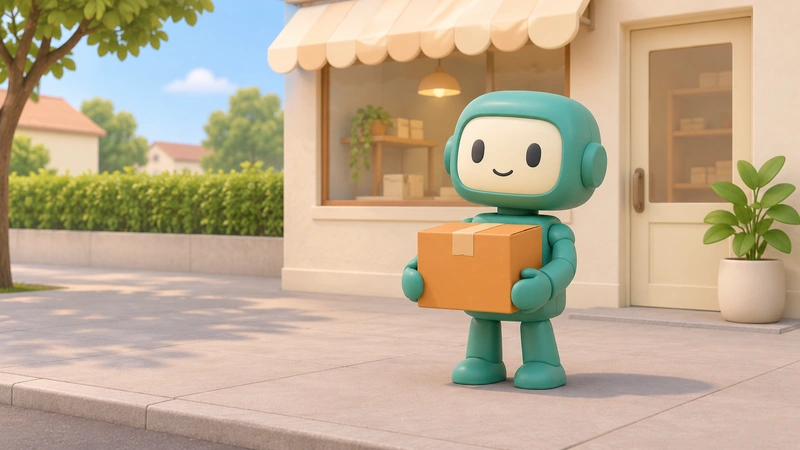
Observed result: Smooth rounded forms and soft contact shadows distinguish this from the clay and retro versions. Both hands hold the parcel and both feet are visible.
Smooth surfaces and soft bounced light give the character volume, with a more finished render appearance than the retro game version.
Useful for: A character presentation or a standalone story scene with rounded three-dimensional forms.
FULL PROMPT
Create one original static illustration of a small teal delivery robot carrying a plain orange cardboard parcel in both hands. The robot has a rounded square head, two dark oval eyes, a cream face panel, a short rectangular torso, two arms and two short legs. Show it standing in a three-quarter view on a quiet neighborhood sidewalk, with one simple cream storefront and one potted plant behind it. Keep both feet, both hands and the entire parcel clearly visible. Use an eye-level view and a horizontal 16:9 composition, with generous empty space around the subject. No other characters, lettering, logos, watermark, panel borders or decorative frame. Render the scene as an original polished 3D cartoon still. Use smooth rounded geometry, softly matte teal surfaces, a warm orange cardboard parcel, gentle bounced light, soft contact shadows and clean readable forms. Keep the robot's expression friendly and understated. Keep the storefront simple and all essential subject details sharp. No clay fingerprints, visible polygon facets, toy packaging, brand imitation or exaggerated glossy reflections.
Practical tip: Specify matte surfaces when a robot keeps becoming shiny metal. Ask for restrained expressions if the eyes dominate the entire head.
What to check: The fingers should grip the parcel plausibly and the feet should have clear contact with the pavement.
Which style should you try first?
For a readable character scene, start with hand-drawn 2D. The outline makes small details easier to separate, and a limited shadow treatment keeps the brief manageable. Comic-book art is a stronger direction when you want large dark shapes and print texture.
For a simple graphic, start with flat vector-style or minimal line art. Compare the image at the size where people will actually see it. Thin contours and tiny accents that look elegant at full size may disappear in a small card. These are generated illustration concepts: request an editable vector file separately if you need actual vector production artwork.
For a material-led look, compare clay and paper cutout. Clay needs rounded, pressed surfaces; paper needs flat layers and narrow overlap shadows. If both look like smooth plastic, the material distinction has not come through.
For 3D character development, compare retro game and polished 3D. The first calls for visible facets and simple textures. The second calls for smooth forms and soft lighting. Calling both “3D cartoon” leaves out the difference you are trying to communicate.
How to adapt a prompt to your own character
Replace the subject sentence and its appearance details as one block. If you change the robot to a fox, remove the cream face panel and mechanical torso rather than leaving contradictory instructions in the prompt. Keep one action and one main prop until the silhouette reads clearly.
For example, a replacement subject could be: “A small rust-orange fox with a cream muzzle, dark oval eyes and a short teal jacket, holding a plain orange parcel in both paws.” That is a suggested text adaptation, not a generated result shown here. Keep the framing and style paragraphs unchanged for your first comparison.
If preserving an existing design matters more than exploring alternatives, use a reference and check the signature features after every edit. Our guide to keeping the same character in AI images covers that separate task. A change of medium can alter head shape, limb thickness and expression even when you repeat the same descriptive words.
Fix the specific problem you can see
The chalk or glow version looks like a normal 3D scene. Clarify that the entire picture is made from chalk marks or luminous contours. Remove material descriptions such as reflective metal from the subject. Otherwise, the generator has two competing directions.
The paper or clay version looks like plastic. Reinforce the physical evidence: flat cut edges and shallow layer shadows for paper; pressed seams and subtle fingerprints for clay. Keep the rest of the prompt stable rather than adding a long list of unrelated quality adjectives.
The hands merge with the parcel. Ask for a readable gap between the forearms and torso, with each hand touching a different side of the box. If an edit changes other features, compare it with the previous version before keeping it. Image edits can affect areas outside the requested change, as OpenAI’s documentation notes.
The robot is cropped. Request a wider view with the whole body and parcel inside the frame, with empty space above the head and below the feet. If you need to change the final shape, use our guide to changing an AI image’s aspect ratio without cropping the subject.
The same style keeps drifting. Save the most useful result as a visual reference. Repeat its palette, contour treatment and shadow rules in later requests. Consistency still needs inspection; neither a reference nor a repeated prompt guarantees identical details.
Check the result before using it
First look at the picture small. Can you recognize the character, the parcel and the action without zooming? Then inspect the full-size file for missing fingers, uneven eyes, broken contours and unwanted writing.
Next check whether the style has its defining feature. A chalkboard background alone does not make a chalk drawing. A paper texture on a rounded toy does not make a paper cutout. Keep the image that clearly communicates the direction you intended, even if a more elaborate alternative initially looks impressive.
Finally, check the file you actually saved. Vector-style art may arrive as a raster image, a 16:9 request may need dimension checks, and a clay-look still is not a stop-motion clip. Those distinctions matter when preparing a website, presentation or character production brief.
Choose one direction, replace the robot with your own subject, and keep the strongest visual instructions. A short, coherent description of line, shape, shading and material is a more useful starting point than combining every fashionable style word in one prompt.