


Can ChatGPT remove a background without changing the original image? In our November 20, 2026 tests, the answer depended on the editing method. Generative edits often looked attractive but changed the subject or framing. Dedicated background removers were more useful when the goal was to retain the photograph itself.
We compared four real photographs using conversational ChatGPT edits, remove.bg and Adobe Firefly’s background removal feature. We also tested alpha-mask editing on two products. The most revealing failure was a convincing checkerboard that was actually part of an opaque image.
Quick answer: which method should you choose?
| Method | Best use | Main limitation |
|---|---|---|
| ChatGPT generative editing | Creative product imagery | May redraw details |
| remove.bg | Quick preview cutouts | Small free downloads |
| Adobe Firefly Remove Background | Full-size cutouts in our tests | Check hair and edges |
| Original RGB + alpha mask | Strict pixel preservation inside the subject | Mask quality depends on segmentation |
ChatGPT background remover: generation versus masking
There are two distinct ways to remove a background in ChatGPT. Generative image editing produces an edited image and may reconstruct parts of the subject, even when the prompt requests no changes. A non-generative workflow can instead use code to estimate a foreground mask and attach it to the original photograph as an alpha channel. This keeps the source RGB values wherever the mask leaves the subject fully opaque, but the mask itself can still be inaccurate.
These are different tasks: creating a transparent background, preserving the original subject and obtaining clean edges. Success at one does not guarantee the others. Our tests include examples of each limitation.
How we tested background removal
We used the same source photograph for each subject across the three services. The cases were chosen to expose different difficulties: thin metal supports, curly hair, transparent glass, and a hand holding a product with small printed text. We retained the available output files, inspected their dimensions and alpha channels, and compared matching-size outputs against the decoded original RGB values. This is a practical comparison, not a randomized benchmark. Exact model build, total attempts and credit consumption were not recorded; no speed or cost ranking is claimed.
For the hand-and-bottle case, our strict ChatGPT prompt was:
Remove only the background from this image. Preserve the original foreground exactly, including the bottle, hand, fingers, product label, logo, all text, colors, reflections, textures, proportions, position and original image dimensions. Do not redraw, regenerate, crop, resize, sharpen or enhance the foreground. Return a PNG with a genuine transparent alpha channel. Do not simulate transparency with a checkerboard pattern.
ChatGPT responded that generative editing could not guarantee the requested pixel preservation and declined to represent a regenerated foreground as unchanged. A separate generated result was available for comparison. The exact wording of every earlier generation prompt was not retained.
Test 1: Headphones with thin metal supports
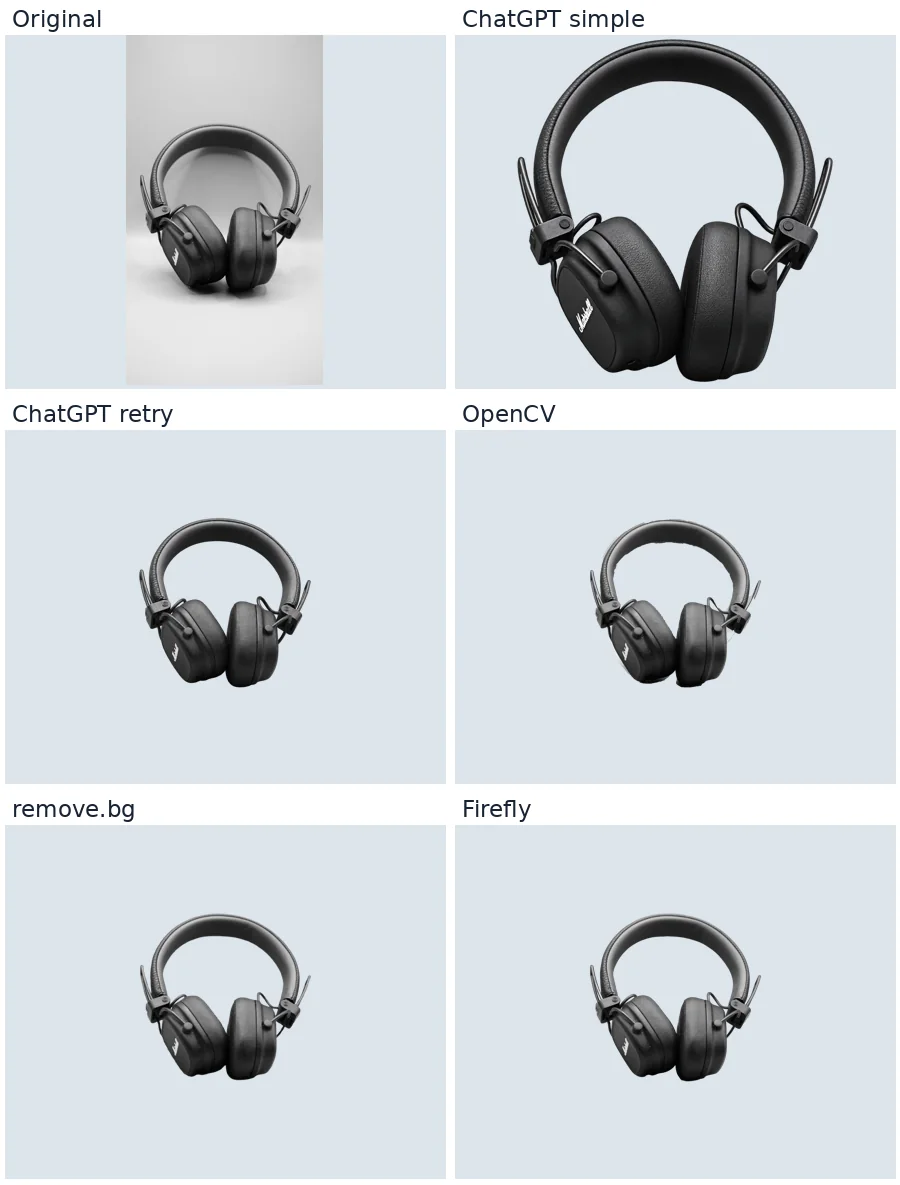
The first ChatGPT result was visually polished, but zoomed in and changed the canvas from 1152 × 2048 to 1199 × 1312. A second result retained more surrounding space, but its dimensions were 941 × 1672. The original product photograph was not preserved exactly by either edit.
The OpenCV result retained the original size and the RGB values of every fully opaque pixel, but left visible background strips around the headband and lower earcup. This is an important distinction: unchanged pixels do not prove an accurate cutout. Firefly produced cleaner edges in this case. remove.bg also produced a usable preview, at 375 × 666 pixels.
Test 2: Curly hair and a complex outdoor background
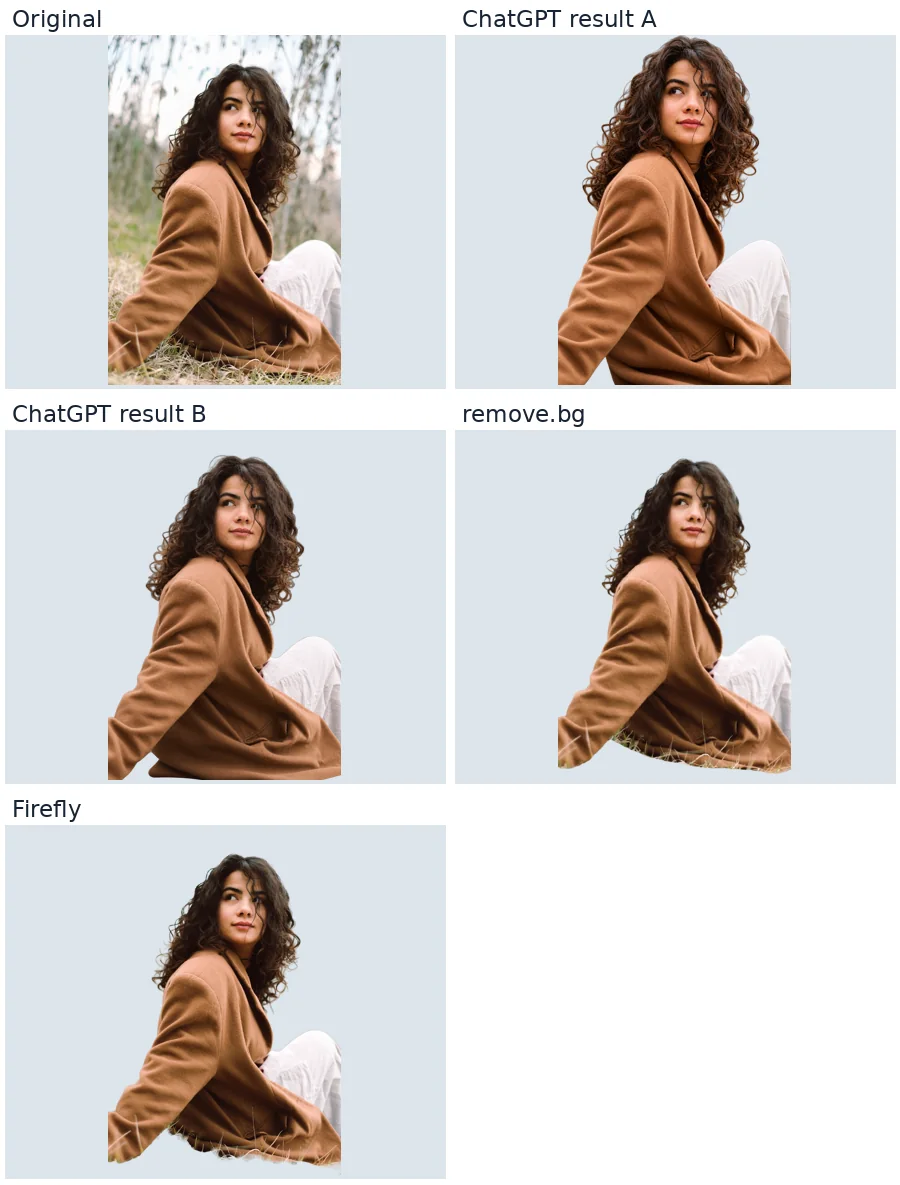
The generated portraits looked convincing at first glance, but the framing, strands of hair and facial details changed. Both outputs were 1024 × 1536 rather than the source 1364 × 2048. A strict preservation request did not guarantee a mask-only operation.
The remove.bg preview preserved the overall pose and composition, with some grass retained near the coat. Firefly retained the original dimensions, but a conspicuous pale halo remained around the hair and some background remained between curls. Neither dedicated tool produced a flawless cutout. For a portrait that will be placed against a dark background, inspect individual strands and refine the mask rather than regenerating the face.
Test 3: Transparent perfume bottle
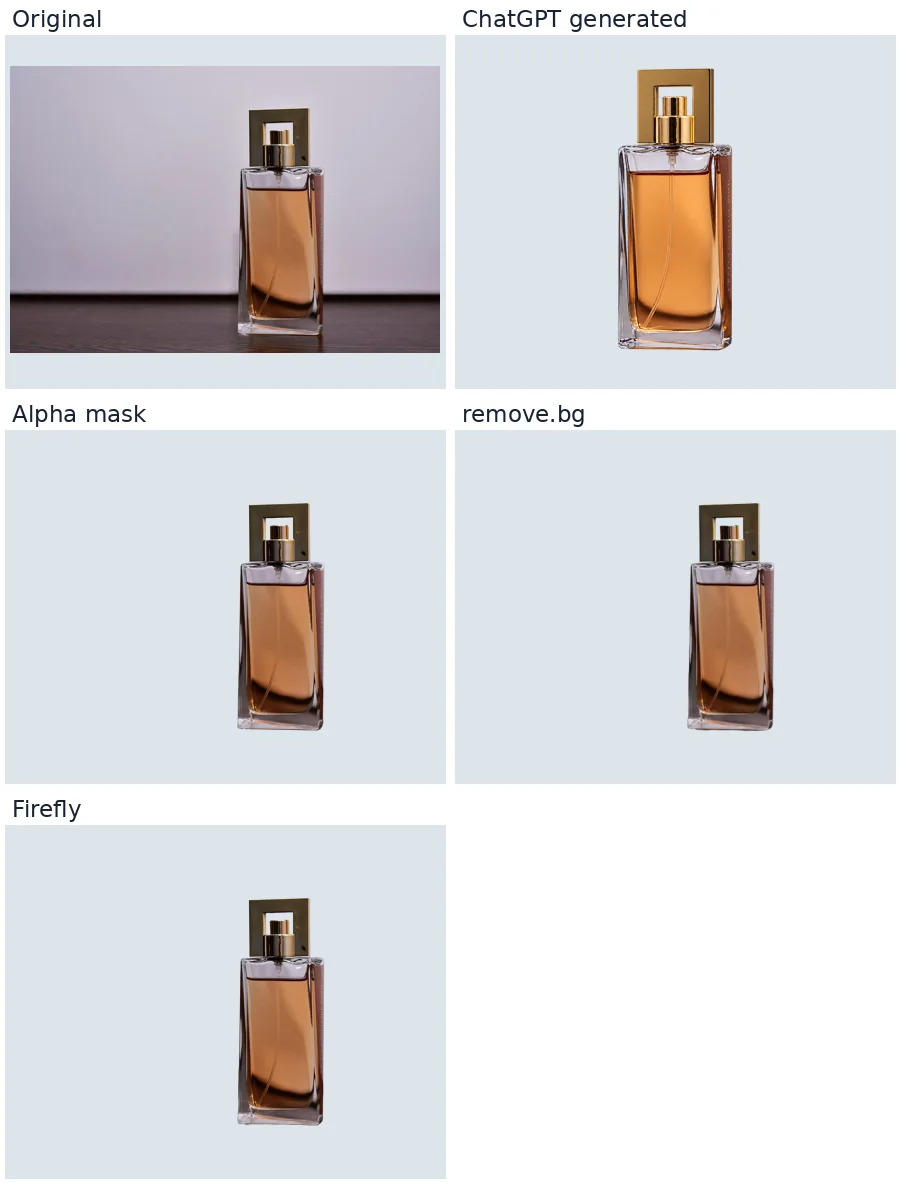
The generative result enlarged and centered the bottle, brightened the liquid and changed reflections. The alpha-mask result kept its location and the original appearance of fully opaque pixels. Both dedicated removers isolated the bottle, including the opening in the cap, with minor edge imperfections visible in the larger versions.
Glass exposes a fundamental limitation: the original background is already visible through the material. A silhouette mask can remove the area outside the bottle, but cannot recover the background-free appearance of transparent glass from a single photograph without estimating new pixel values. For accurate product compositing, use a controlled studio backdrop or refine transparency and reflections manually.
Test 4: A product label and a hand
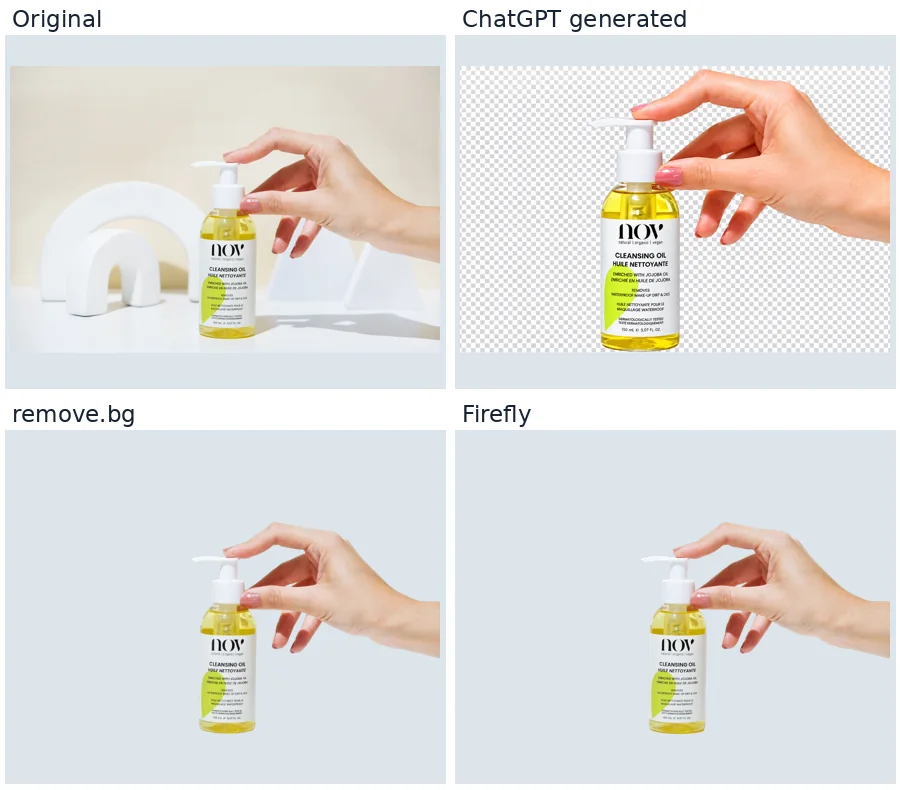
The generated image changed the framing, skin appearance and product details. More importantly, the downloaded RGBA file had an alpha value of 255 at every pixel: the visible checkerboard was baked into the image. It was not a transparent cutout.
Both dedicated tools returned files containing genuinely transparent pixels. Firefly kept the original 2048 × 1365 canvas and the label remained visually close to the source. The remove.bg preview was only 612 × 408, making small type harder to inspect. Always compare the ingredient list, quantities and brand lettering with the original before using a product image commercially.
Actual downloaded image dimensions
| Subject | Original / Firefly | remove.bg preview |
|---|---|---|
| Headphones | 1152 × 2048 | 375 × 666 |
| Portrait | 1364 × 2048 | 408 × 612 |
| Perfume | 2048 × 1365 | 612 × 408 |
| Cleansing oil | 2048 × 1365 | 612 × 408 |
All four Firefly files retained the original canvas dimensions. All four remove.bg downloads were approximately 0.25 megapixels. The remove.bg interface offered a free preview and an option to unlock a larger download. Adobe describes its remover as available with a free Adobe account, subject to usage limits. Check current terms before relying on either for commercial or high-volume work.
Does full resolution mean identical pixels?
No. We compared RGB triplets at matching coordinates, using only pixels with output alpha exactly 255. The following values are measurements from our downloaded files, not subjective quality scores.
| Subject | Firefly exact RGB match |
|---|---|
| Headphones | 16.318% |
| Portrait | 1.783% |
| Perfume | 1.909% |
| Cleansing oil | 2.194% |
What these numbers mean in practice: an exact RGB match requires all three color values of a pixel to be identical. Even a change of one level counts as a mismatch. The percentages therefore tell us how many pixels matched exactly, not how different the remaining pixels look. Compare the photographs and edges as well as the numbers.
The two mask-based ChatGPT files for headphones and perfume had a 100% exact match among fully opaque pixels. RGB values across the entire canvas did not all match, so we cannot claim that every hidden RGB value was retained. Firefly’s low exact-match percentages do not mean that it redrew the subject: encoding, color handling and processing may change individual channel values. This metric is strict and is not a measure of visual similarity or edge accuracy. The resized remove.bg and generative outputs were not evaluated with this coordinate-based metric.
How to remove a background without changing the subject
- Keep an untouched copy of the original photograph.
- Open Adobe Firefly Remove Background or remove.bg. Use the dedicated removal feature rather than a generative replacement prompt.
- Download the transparent PNG, preferably at original resolution.
- Place it over white, dark and contrasting backgrounds. Inspect thin supports, hair, holes, fingers and glass at 100% zoom.
- Compare the label, face and dimensions with the original. If exact RGB preservation is essential, use a mask applied directly to the source in a layer-based editor and verify the result.
For a stubborn outline, refine the existing mask instead of repeatedly asking an image generator to redraw the edge. See our guide to fixing white edges.
How to check genuine transparency
A checkerboard in a preview is not evidence of transparency. Open the downloaded file in an editor and place a colored layer underneath. For a technical check, inspect its alpha channel: an entirely opaque file cannot reveal the layer below. PNG can carry alpha, but the extension alone does not guarantee it. See our transparent background verification guide for more details.
Which background remover should you use?
- Social media and creative ads: use ChatGPT when a fresh visual interpretation is acceptable; use a dedicated remover when the existing photo must stay recognizable.
- Marketplace product photos: start with Firefly for a full-size cutout, then check lettering, proportions and edges against the source.
- Quick small previews: remove.bg was convenient in our tests, but the downloaded previews had limited resolution.
- Hair and glass: inspect the result on contrasting backgrounds and refine the mask manually where necessary.
- Exact source pixels: apply a mask to the original image and verify both the RGB values and the silhouette.
Use generative editing when the goal is to create an attractive new marketing concept, rather than a faithful cutout of an existing product. If the photo must represent the actual item for a catalog, accurate packaging and proportions matter more than a polished reinterpretation. Our product photo accuracy tests explain why labels deserve particular attention.
Final verdict
For ordinary background removal, start with a dedicated remover. Firefly was the most practical full-resolution option in our four-image sample, although its portrait edges needed refinement. remove.bg offered convenient smaller previews. ChatGPT’s generative edits were visually appealing but unreliable for exact preservation; the non-generative mask approach preserved opaque RGB values but required better segmentation. Choose the method according to the required fidelity, not just the appearance of the preview.
Frequently asked questions
Can ChatGPT create a transparent PNG?
Yes, but a PNG may still be fully opaque. Our product-label test produced a baked-in checkerboard. Verify the downloaded alpha channel or place the image over a colored layer.
Is ChatGPT better than remove.bg for background removal?
For faithful cutouts, remove.bg was more practical than generative ChatGPT editing in our sample. For creative reinterpretation, ChatGPT offers different advantages. The free remove.bg previews were smaller than the originals.
Does ChatGPT keep the original photo resolution?
Not always. Several generative edits changed dimensions or framing. Our two mask-based outputs retained their source canvas sizes.
Which free background remover should I try first?
Firefly was our practical choice for full-size output in this sample; remove.bg was useful for smaller previews. Check current download and account limits before choosing.
Sources and test limitations
Original photographs: Pexels image IDs 30428610, 20367770, 1653085 and 28861614. Tool information: Adobe Firefly background remover and remove.bg. The article’s WebP comparison panels are resized display copies, not the raw PNG files used for measurement. Results apply only to these files and this test date; no universal accuracy ranking is implied.